Showing posts with label tools. Show all posts

Wednesday, December 12, 2012

Enable Advanced Telemetry on Flex or old SWFs with SWF Scount Enabler

Adobe Scout allows developers to profile SWFs like never before. The telemetry data sent by the release Flash Player to Adobe Scout is by default only set to send basic telemetry data. To be able to see data for the AS3 sampler, Stage3D rendering, and DisplayList rendering you have to enable the SWF (password is optional).
This is done by using the newer asc2 compiler that comes in Flash Builder 4.7 or in the AIR sdk found in the Gaming SDK from Creative Cloud. Currently asc2 only works with ActionScript projects and implements a new flag called -advanced-telemetry or a check box in Flash Builder 4.7 ActionScript project properties.
To enable SWFs that don’t use asc2, mainly Flex apps or legacy SWFs, you need to use a script to write a specific SWF tag into the SWF file. This doesn’t change the SWF abc code but just adds a SWF tag that Flash Player will use to start sending telemetry data. There is a python script written to help with writing this tag. But the python script requires python and I wanted something a bit easier to use so I created SWF Scout Enabler.

To use the application all you need to do is drag your SWF into the application and it will create a new SWF (or override if you give it a “” suffix) that is enabled for advanced telemetry.
The application will also save the last suffix and password used. It also has the ability to re-process the last processed file by clicking on the top right box image.
Last but not least, the full source of the application can be found on github.
Download the SWF Scout Enabler AIR application.
I need to thank Joseph Labrecque for testing out the app.
Note: This app has been tested on a bunch of SWFs but if it is not working let me know. There seems to be a bug with Adobe Scout on AS2 SWFs older than version 8. Adobe Scout will never do ActionScript sampling on AS2 SWFs but it will do basic telemetry.

Read more: Enable Advanced Telemetry on Flex or old SWFs with SWF Scount Enabler

Wednesday, October 17, 2012

Project “Monocle”, profiling taken to the next level

Adobe project "Monocle"Back in August, I posted a sneak peek video of project "Monocle" the next-generation profiling tool for ActionScript based content. Last week at GDC online, I gave a talk entitled "Changing the game" and demoed Monocle. Again, the feedback we had was unbelievable.
I have been using Flash for 13 years now and I have seen lots of cool things happening in Flash. The introduction of AMF in Flash Player 6 (Flash Remoting) allowing fast and efficient RPC communications taking care of serialization for you (AMFPHP, anyone? Props to Patrick Mineault). Damn, that was nice. The introduction of BitmapData in Flash Player 8, which enabled so much expressiveness and Flash Player 9 with ActionScript 3 and a world of new possibilities. I think Monocle is the next big thing happening to Flash, it will just revolutionize the way we work with Flash Player and AIR.
I got lots of emails and tweets from people asking to get on the prerelease. I am really excited to announce that all of you guys can now get access to "Monocle"!
Please register, test Monocle, look for bugs, give us feedback! So what do you need to get started?
1. Register here.
2. Download Flash Builder 4.7 Game Development Beta 2 with Project Monocle Support.
3. Compile your project and make sure the compiler option "Enable Detailed Telemetry" is enabled. Joseph Labrecque has posted great details here.
4. If you are using Flash Pro or have existing SWFs you don't want to recompile. We provide a little python script to post process you SWF and make them profilable.
I hope you guys will love it. Enjoy!
Read more: Project “Monocle”, profiling taken to the next level

Thursday, July 12, 2012

New tutorial: Profiling memory with TheMiner

Tutorial: Using the Memory profiler

Most of the time, Flash performance issues come from bad memory management.
Object instantiation take a lot of time, and since FlashPlayer work with a Garbage Collector, having tons of objects can make it go nuts.
Good practice is to remove all instantiation from loops, keep a minimum of object in memory and use serialization and bytearrays to keep some data.
This profiler show you what the VM is reporting as object being allocated and removed (garbage collected).
Here is what the profiler look like:

1. Search filter
Since there is a lot of different object type being managed by the VM,
just listing them would make it hard to find specific data.
This input box let you enter any text to filter the visible object using their QName
When the filter search is ON (there is text inside the box), the box appear green,
and only class name with the text in it appear in the list [...]
Read more: New tutorial: Profiling memory with TheMiner

Thursday, September 1, 2011

movieMonitor: an AS3 performance monitor with 10.1 features

Do you want to know how your latest Flash project is performing?

Here is movieMonitor, a little widget useful to display FPS, memory usage, stage size and number of children.

It’s based upon Hi-ReS-Stats by Mr.doob, but I added some new features to fit my needs, using some of the new System properties introduced by Flash Player 10.1

The usage is simple: just add

stage.addChild(new movieMonitor());

And you’re done. You can change stage with any DisplayObject if you want.

Look at this example:

Let’s see what do these figures mean:

FPS: current amount of frames per second (after the “/” you can see the amount of frames per second set in movie properties)

Minute average: the average amount of frames per second in the latest minute

ms per frame: the amount of milliseconds needed to draw the current frame

Direct: the amount of memory (in Megabytes) currently in use that has been directly allocated by Flash Player

Max direct: the maximum amount of memory allocated by the Flash Player so far

Total: the entire amount of memory (in Megabytes) used by the application, including the memory used by the container application, such as the web browser

Garbage: the amount of memory (Megabytes) that is allocated but not in use. This unused portion of allocated memory fluctuates as garbage collection takes place

Width: the width of the stage, in pixels. The width is calculated based on the bounds of the content of the stage (after the “/” you can see the stage width set in movie properties)

Height: the height of the stage, in pixels. The height is calculated based on the bounds of the content of the stage (after the “/” you can see the stage height set in movie properties)

Children: the number of DisplayObjects in the movie.

This is the script [...]

Read more: movieMonitor: an AS3 performance monitor with 10.1 features

Friday, June 17, 2011

Flixel Power Tools v1.7 – Kaboom!

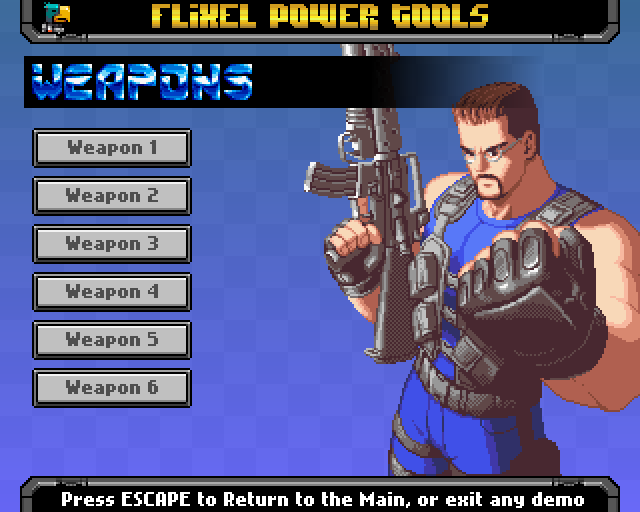
Flixel Power Tools FlxWeapon Menu Options

It’s been a month in development but it’s finally here – Version 1.7 of the Flixel Power Tools has now gone from dev to master – and I urge you all to give it a play! I have also re-organised my site so that the tools and all sub-classes are now easily accessible from the right-hand side bar. More info, more screen shots, less scrolling :)

V1.7 includes a brand new Demo Suite system (don’t forget to try the Credits button :) ). It’s now easier and quicker to get to the examples, which is just as well as we’ve over 60 of them in this release. Don’t forget to download the whole package from github, as it includes a Getting Started manual PDF, the full source code to all of the demos, all of the graphical and audio assets (warning: copyright, don’t use commercially!), as well as the tools themselves [...]

Read more: Flixel Power Tools v1.7 – Kaboom!

Thursday, June 16, 2011

How to create a Flash platformer using Citrus Engine

More than a year ago I shows you how to create a little game prototype using Citrus Engine.

A year has passed, and now Citrus Engine is back with version 2.0 which promises to let us create complex games in a quick.

For all you specs maniacs, here it is a brief list of features:

* Blazing 50 FPS in the browser on current machines, and 250+ FPS on the desktop (or Adobe AIR).
* Integrated with Box2D physics, which allows for tumbling crates, pulleys, vehicles, and just about anything else you can imagine, without the limitations of a grid.
* Supports multiple rendering methods with very little code. Like blitting and sprite sheets? Citrus Engine’s got it. Prefer animating using the timeline? No problem.
* Hijack the Flash IDE and use it as a level editor, for easily laying out and iterating on level designs.
* Robust documentation includes and ASDoc API, tutorial videos, and a forum.
* Standards-based code API means developers and designers spend more time tweaking the fun stuff, and less time debugging.
* Level-based progressive downloading allows gamers to start playing the game quicker by only downloading what the next level needs.
* Pre-made commonly used objects, like a hero, coins, enemy, platforms, clouds, and more!
* Easily use embedded or dynamic graphics.
* Decoupled architecture allows for custom rendering methods, like blitting or 3D.
* Sound management
* Keyboard and input management
* Built-in particle system
* Intuitive Signals event framework

Ok, the boring part is over. Now take this little prototype I made in 20 minutes (yes, 20 minutes):

Look at what we have:

* The hero (on the bottom right)
* A pushable crate (on the bottom left)
* Some platforms around the stage
* A moving platform
* An enemy (on the upper right corner)
* A coin (on the upper right corner)

Move the hero with LEFT and RIGHT and jump with SPACE. Try to grab the coin. See what happens if you touch the enemy. The game mechanics are complex enough to represent a level of a good platformer. But it took me only a few lines to do it.

This is the main class [...]

Read more: How to create a Flash platformer using Citrus Engine

Thursday, June 2, 2011

DAME 2 Released – My Favourite Game Map Editor!

DAME editor logoAlthough I’ve been beta testing this for a while now, Charles Goatley today officially released DAME 2. I first started using DAME back in September 2010 when the first version was released on the Flixel forums, and it has gone from strength to strength since then. Charles has done a wonderful job keeping on-top of bug reports and dealing with feature requests, and v2 is easily the single biggest update yet.
DAME is a traditional 2D Tile Map Editor running on Adobe AIR, which means it works across Windows, Mac and Linux. The map editing view is generated with Flixel, so if you use it for a Flixel game you know it’s going to look exactly the same as it does in the editor. It has a comprehensive export system and custom scripts can be written in Lua. From simple CSV or XML data to writing out fully blown AS3 classes.

Version 2 brings interface refinements and a lot of new map building tools to the table, including:

  • Certain windows (tile palette, sprites, layers and properties windows) are now dockable.
  • Isometric tilemap support – support for diamond, staggered diamond and skewed. Tile matrix and brushes all still work as expected with these layer types.
  • Tiles can be stacked on top of each other.
  • Improved visuals for selected tiles.
  • Improvements to drawing on tilemaps.
  • Can draw lines on tilemaps.
  • Flood fill for tilemaps.
  • Can select, move and scale regions in tile drawing mode.
  • Can copy and paste in tile drawing mode.
  • Right click when drawing brings up context menu.
  • New configurable 16 colour palette for drawing.
  • Tiles can be animated.
  • Can have per tile properties.
  • Can repeat tilemaps on individual axes.
  • Can use any system font for text boxes.
  • Can use bitmap fonts for text boxes.
  • Increased undo history.
  • New Sprite Trails – automatically populate a path with a series of sprites.
  • Sprites can be automatically sorted for depth.
  • Sprites can use a Z value for height placement.
  • All object layers can be aligned with an isometric tilemap layer to allow exported positions to be relative to the tilemap’s ‘real’ coordinate system.
  • Aligned shapes on shape layers will rotate/skew to fit the tilemap shapes.
  • Can change the frame for any sprite to be different from the sprite entry.
  • Tile sprites are now spritesheets – can scale and translate the image within.
  • Can rip an image to create a tilemap layer and tileset.
  • Choice of themes for DAME.
  • Importing dam projects with sprites improved to find pre-existing matches in current project.
  • Can save sprite entry lists separate to a .dam project as a .dsf (DAME Sprite File), allowing you to have multiple sharing one list of sprites.
  • Can move an entire group in real-time.
  • More of the session is saved in a .dam file allowing you to resume editing where you left off much easier.
  • Tiles now preview in tilemap layer properties window.
  • Can gives shapes different colours.
DAME 2 Released – My Favourite Game Map Editor!

Wednesday, June 1, 2011

SWFRETools

SWFRETools are a collection of tools built for vulnerability analysis of the Adobe Flash player and for malware analysis of malicious SWF files. The tools are partly written in Java and partly in Python.

The following tools are part of the SWFRETools:

  • Flash Dissector: Binary viewer for SWF files
  • SWF Parser: Build your own tools using this parser
  • Minimizer: Automatically minimize crashing SWF files
  • FP Debugger: Trace the Flash Player dynamically
  • StatsGenerator: Generate stats over SWF files
Read more: SWFRETools

Thursday, April 7, 2011

SWFToPNG

SWFToPNG:

SWFToPNG is a tool to export Flash assets to PNG. It automatically renders out the symbols in a SWF to a series of PNG files, and optionally crops out the transparent bits around the edges as well as retaining the registration points of the items.

Some useful information:

  • This only works with AVM2 SWFs, so that’s Flash 9 player and higher with AS3
  • It will only understand MovieClips on the timeline (no buttons!) and they must be exported for ActionScript for the filenames to be correct (this is easy enough to do with a few clicks in the Flash IDE).
  • The program is memory-intensive. A bitmap is created for each frame of the SWF and held in memory until the files have been written (it was designed this way to facilitate cropping and quick development; it’s not intended as an export utility for your ten minute animations!)
  • Timeline code that causes clips to loop infinitely will also cause the rendering to loop infinitely.

Tuesday, April 5, 2011

FlxHealthBar added to Flixel Power Tools

FlxHealthBar added to Flixel Power Tools:

FlxHealthBar

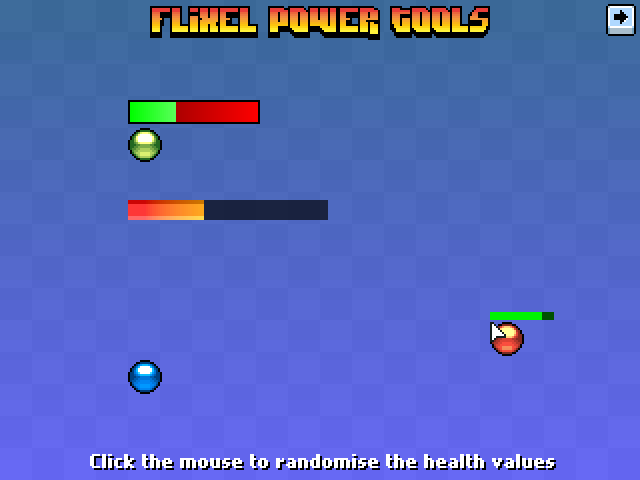
Health bars are a commonly used feature in games. From little health bars floating over players / enemies heads, to bars in the UI / HUD. This class provides a really fast way to create them, and they are highly customisable. It features:

  • 3 different types of bar: Plain-colour filled, Gradient filled or Image filled
  • All fill types support alpha levels
  • Optional 1px border around the bar with configurable colour
  • The bar can fill in one of 3 directions: From left to right, right to left or from the inside out
  • Bars are associated with FlxSprites (its parent). When the health value of the parent changes, the bar updates automatically (within a given threshold limit)
  • Bar can be fixed on-screen, and supports scrollFactor
  • Bar can “float” with its parent at a given x/y offset from the parents origin
//  Create a tiny 32x4 health bar that floats above the 'wolf' sprite
wolfHealth = new FlxHealthBar(wolf, 32, 4, 0, 100);
//  Tells it to track the x/y position of the wolf FlxSprite but offset by -5px on Y
wolfHealth.trackParent(0, -5);

Visit the Flixel Power Tools page to see it in action in the Test Suite, and find the svn download details.

Monday, April 4, 2011

AS3: converting XML to JSON object

AS3: converting XML to JSON object:

I'm absolutely sure that you are using external data in your flash/flex applications. It is a good practice to transfer information in XML format. Most of the projects that I'm working on also use XML and in most of them I have a class that converts the data to JSON object. The problem with this workflow is that the parser's logic is always different because the XML is different. These days I wrote a class that solved this problem and directly converted every given XML file to a JSON object [...]

Saturday, April 2, 2011

Flash Game Dev Tip #7 – Introducing the Flixel Power Tools

Flash Game Dev Tip #7 – Introducing the Flixel Power Tools:

Flash Game Dev Tip #7

Tip #7 – Introducing the Flixel Power Tools

Quite frankly flixel is awesome. It allows me to rapidly build games. The sort of games I like playing (and therefore making!) While it does a lot for you it is lacking in a few key areas. After all it’s just a framework, and frameworks are meant to be built-upon.

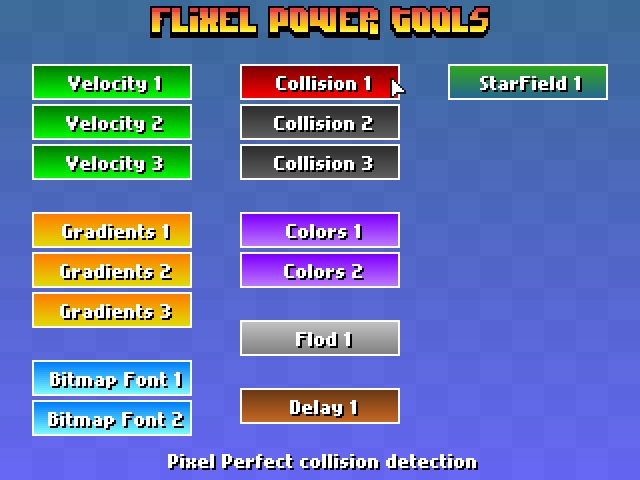
That is where the Flixel Power Tools come in! At the time of writing there are 13 new classes, all neatly arranged in a single package, that push flixel just that little bit further. There is also a test suite which include 16 easy-to-follow examples of the power tools in action, with a funky visual menu system and a way to actually see what they do. I always find it easier to learn by looking and then checking out the code!

Flixel power tools menu

The majority of these tools work without even touching the core flixel code-base. Although there are some that do require it, so with that in mind I’ve provided a fully Patched version of flixel 2.43. But if you’ve got your own build there are instructions on manually patching at the top of each class that needs it, and work-arounds should you not want to touch anything at all!

I will continue to expand the library of tools and the test suite. And of course keep them in-line with the way in which the flixel codebase is changing at the moment. For now here is a quick overview of what each new class offers:

FlxBitmapFont

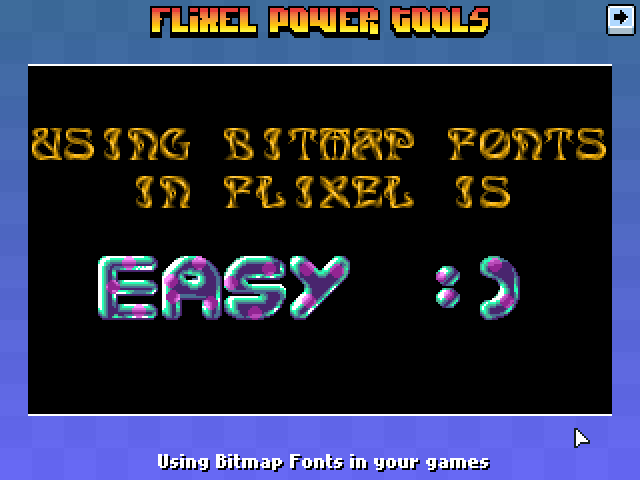
Allows you to use bitmap fonts in your games very easily. It’s extremely fast. Fast-enough for real-time updates, or a GUI or HUD display. The rendered text is just a normal FlxSprite, so you can do with it whatever you like. Extensive character-set handling options and fully documented.

Flixel power tools fonts


font = new FlxBitmapFont(bluepinkFontPNG, 32, 32, FlxBitmapFont.TEXT_SET2, 10);
font.setText('easy :) ', true, 0, 8, FlxBitmapFont.ALIGN_CENTER);

FlxButtonPlus

Takes the FlxButton class you already know, and then pimps it out some! You can specify parameters for the callback, the button width, height and text in the constructor. Change the button text dynamically. Set hover-over and hover-out callbacks. And the default button style is now a nice gradient filled affair (which you can control the gradient colours of yourself). Or just use loadGraphic to replace it.


playback = new FlxButtonPlus(32, 32, toggleMusic, null, 'Play Music');

FlxCollision

Collision in flixel is handled with bounding boxes. Which is basically two rectangles colliding, and if they intersect you get a collision back. This class takes it the necessary step further and adds pixel perfect collision testing. Only the intersecting area is tested for speed. And you have control over the alpha tolerance level (so you can exclude pixels with an alpha level less than what you need). It also works with scaled, rotated or animated FlxSprites! and is perfectly fast enough to use in real-time.

Flixel power tools collision


if (FlxCollision.pixelPerfectCheck(player, spikes))
{
    // Player really did hit those spikes!
}

FlxColor

[...]

Thursday, March 24, 2011

AS3 Geom Exporter

AS3 Geom Exporter:

AS3 Geom Class Exporter is a 3DS Max designed script that allows you to directly export 3D models to AS3 classes. Its main benefit is that you don’t need to load and parse a text files (collada, ase, obj, 3ds) anymore. You just have to import the class and create an instance, like you do with usual objects such as plan, sphere and box classes.

The script is compatible with the following AS3-3D engines :

Saturday, March 19, 2011

Embedding Assets in AS3

Embedding Assets in AS3:

Getting assets (such as images and sound files) into your AS3 project can be simple, but I ran into a few problems (and nice solutions!) that might help others out too. I thought I’d jot it down into a blog post!

How I used to do it

I use FlashDevelop, and I try to avoid using the Flash IDE for development. I found it incredibly handy, though, that I could copy any asset – even vector art – with a simple drag-and-drop into Flash, and export the whole bundle as an .SWC file.

FlashDevelop is awesome handling SWC files; a simple pair of clicks gives you full access not only to the assets, but any sub-classes and properties the assets may have (as imbued by Flash itself). It’s quite awesome, and it’s how I’ve done everything to-date.

The Problem

There are a few downsides to Flash’s SWC asset library:

  1. Porting to other platforms or languages (that don’t support Flash files) is a pain in the butt; without SWC support you have to re-invent your asset importing routines for each platform.
  2. Even when sticking with Flash, importing assets into Flash that you’ve already separated out into individual files can be annoying and tedious (as opposed to developing all your assets within Flash or Illustrator)
  3. You need to own a copy of the Flash IDE (the Professional version, too, if you want to make commercial projects)

The first item on that list is the one that bugged me the most. No other development environment has a standardized equivalent to the SWC Library; converting your game to any other platform or language suddenly gains an extra hurdle, and requires exporting of assets and all sorts of hoop-jumping.  I know this first hand; there was some problems creating the mobile editions of Steambirds.

When I look at various Flash blitting/game engines, such as Flixel and FlashPunk, and they tend to support sprite sheets, image file imports, and other such “industry standard” ways of doing things. Converting from these engines to – let’s say, iPhone – will be a whole lot easier.

There’s just one little thing standing in the way of me following in their path…

I hate SpriteSheets

SpriteSheets were invented by old console programmers that couldn’t manage their assets with the hardware they had. Instead of making large images, they’d break everything down into sprites – dump them all into a single crammed-in file, and re-construct environments piece-by-piece. This is what gives Super Mario Bros. that square look, and why so many games seemed to be built on a grid.

SpriteSheets nearly require you to make all of your assets the same size, and even if you don’t: Any time you save managing dozens of tiny files will be made up in creating a lookup table (or a map) to your spritesheet [...]

Wednesday, March 16, 2011

Introduction to AntPile

Introduction to AntPile:

AntPile is an open source project I started to help Flash developers get up and running with Ant quickly. AntPile is a collection of Ant Scripts which cover everything from building a SWF, SWC, AIR, Android and even Unit Testing. The source code can be found at http://github.com/theflashbum/AntPile [...]

Saturday, March 12, 2011

Create complex Box2D shapes in a click with PhysicsEditor

Create complex Box2D shapes in a click with PhysicsEditor:

With Box2D is very easy to create primitives like boxes or spheres, but when you have to handle more complex shapes, things get nasty.

You have to use compound objects and it’s not as intuitive as it should be.

In our help comes PhysicsEditor by Andreas Low

Physics Editor for creating Box 2D shapes

The software allows you to create complex bodies simply dragging your shapes inside the editor and press the auto trace button! No more clicking. Then adjust the shape’s physics parameters and directly export to your game development framework.

I am currently using this software for a game prototype I am designing but I am not ready to make a review, but I can assure you this software really rocks.

Watch the official video:

I am also using the .as exporter so at this time I am able to show the Flash results of what you are seeing in the video:

I removed the textures so you can see how objects are made.

"

Wednesday, March 9, 2011

Adobe Wallaby converts Flash to HTML 5

Adobe Wallaby converts Flash to HTML 5: "

HTML5 one day might be the future for Rich Internet Applications, but at the moment Adobe Flash is the tool of choice for designers and coders everywhere.
This is a problem when the new smartphones and tablets platforms do not support Flash.
We currently prefer to create web applications with the Flash Platform and device in the case of iOS, "switcingh" the user on the secondary application developed with HTML and JavaScript or iOS native language in the case of desktop applications.
To resolve this difference, Adobe released a preview version of Wallaby: A program that converts Flash files for HTML5, using JavaScript, CSS and SVG for the production of Flash-like graphics that no needs plug-in.

Currently, Adobe has demonstrated at last year’s conference MAX2010, the device is rather limited. Scripting or Flash / Actionscript, or embedded videos and sounds are not migrated.
The output is also currently limited to WebKit-based browser, and then mainly-Safari, Safari Mobile, and Google Chrome through its use of features specific to WebKit animation.
Wallaby is not yet suitable for the migration of rich interactive content such as games and the lack of support for scripting of Flash means that even the simplest interactions should be rewritten using JavaScript.

Adobe says that the main objective of Wallaby is to produce an output that has the best combination of performance and quality at IOS.
This lens reveals the immediate aim of Wallaby: allowing advertisers to create rich ads that appear correctly on the iPhone and iPad.
Wallaby allows designers to move their projects and hence reduce the cost of supporting these non-Flash platforms [...]

Writing a JSFL component for Flash AS3

Writing a JSFL component for Flash AS3: "

In case you don’t know, JSFL is a javascript library used to create components for the Flash IDE. So, if you have repetitive tasks that you want to automate, you can create a component that does it for you. Once you have your component debugged, you can actually package it and distribute it as an MXP file for others to use. For example, one of my favorite components is the Preloader Shuffle component that I used to use back in my AS2 days (it seems to be unavailable now). I recently made a component to Rename a class package throughout all the files in a project. It’s essentially a glorified find-and-replace script for multiple FLA and Actionscript files. You can get it here.

I never needed to write a custom component until recently. At work, I have a generic Flash AS3 application that works as a good starting point for new projects. It usually needs pretty heavy modification, but having a simple setup with the preloader, flashvars, error tracking, analytics, and basic pages already set up saves hours of coding on each new Flash project. The one downside is that I have placed all of the classes in a package called “com.sampleclient.” So, I have to rename this class package in all of the Actionscript class files and update all of the linkages in the FLAs. This takes about 20 minutes each time. So, I decided to write a JSFL component to do all of this renaming for me.

Well, the reality of JSFL is that it’s one of the many poorly documented features of Flash. So, actually creating this component took a lot longer than I expected. I’m posting this in the hope that it might save someone else a little time. The finished MXP component is available here. All of the source files that I used to create it are here. Here are a few tips for you if you are thinking of going down this rabbit-hole:

You will need some links to help you get started. I probably referenced a few dozen different blogs and forums to get this component working, but here are a few of the most helpful links I found:

There are some more links at the bottom of this post that I found helpful [...]

Tuesday, March 1, 2011

Alchemy Series Part 2: Environment Setup

Alchemy Series Part 2: Environment Setup:

To get started with Alchemy on a Windows box, you first need to get cygwin installed. Cygwin is a pseudo linux environment that runs under Windows. This gives us access the the LLVM and the gcc compilers. This is how we are going to take C/C++ code and create a swc that we can access directly from flash.

To get started we are going to first need the Adobe Flex SDK, please download this and unzip it to c:\flexsdk
http://opensource.adobe.com/wiki/display/flexsdk/Flex+SDK

Currently the latest release is Flex4.1 Update 4.1.0.16076.

Now we can grab Adobe Alchemy:
http://labs.adobe.com/downloads/alchemy.html

Just check the box at the bottom and download the “Alchemy Toolkit for Cygwin on Windows”
When that finishes downloading, unzip it into c:\alchemy (make sure that you don’t unzip it into folders within that, you want the folder structionto be c:\alchemy and then a bunch of folders such as c:\alchemy\achacks, c:\alchemy\bin, etc…

Next you will need to make sure you have Java installed. If you do, please continue. If you do not, please download and install it from here:
http://www.java.com/en/download/index.jsp

Last up is Cygwin’s setup.exe file:
http://www.cygwin.com/

Look for setup.exe about half way down the page, and download that to c:\cygwin (you can put this wherever you like, but I will be using c:\cygwin and c:\alchemy through out the post for simplicity)

This setup file is basically a client front end that allows you to download and install whatever linux packages you will need to get the job done.

Double click on the setup.exe to get things started.
- Click next on the first screen.
- On the second screen select “install from internet” and click next.
- Set your root directory on the third screen to c:\cygwin and install for all users. Click Next
- Set your local package directory to be c:\cygwin as well, click next.
- Set up your proxy settings if you have any (if you are behind a corporate firewall or something) otherwise select “Direct Connection” and click next.
- Select a mirror, I usually use http://mirrors.kernel.org click next.
- You may get a Setup Alert warning you that this is your first install, so you should check out the docs. This is normal, and fine, just click OK.
- This takes you to the package selection screen [...]

Sunday, February 27, 2011

Changing the web, again. Flash Player with 3D API Molehill

Changing the web, again.:

Zombie Tycoon with Adobe Flash Player using Molehill

A few years ago, the Flash Player team introduced video in Flash Player, and today, we know how the Flash Player change the web for video on the web. Today, we are happy to introduce the public availability of the Molehill (3D GPU accelerated) APIs through the Incubator builds available here.

You cannot imagine how the team is excited to imagine what you guys will do with Molehill, definitely a game changer.

But first, what is this Adobe AIR and Flash Player Incubator thing ?

The AIR and Flash Player Incubator is a place for the Adobe Flash Runtimes team to share with developers features that are under development or experimental in order to get early participation, testing, and feedback from the community.  It is targeted at you guys that are interested in testing out the bleeding edge of runtime capabilities and contributing to the future of the platform. Keep in mind that the capabilities in Incubator builds may or may not be supported in a future release of the runtimes.

We will use the new Adobe AIR and Flash Player releases blog to share announcements about new Incubator builds. I will also relay the info here. For each new Incubator drop, we will highlight the features we are looking for feedback on. Incubator builds will contain features under consideration, development, or just experiments. By providing feedback on the features, use cases or things you will create, you will help us shape the future of the Flash runtimes.

As a developer, the Incubator program is extremely valuable, first, because you get to see features under consideration or development, but it also allows you to test your content against our builds. This way, you can track early in our development process if a current feature you rely on breaks, to make sure your content performs perfectly on the new version of the runtimes.

The Incubator builds are watermarked on the top bottom right of the stage, so that makes things easier to know if you are using an Incubator build or not.
Watermark for Incubator builds

Here are the key two features available in the first Incubator builds :

  • “Molehill” 3D APIs for Flash Player and AIR — A new set of low-level, GPU-accelerated 3D APIs that enable advanced 3D experiences across devices through the Adobe® Flash® Platform runtimes.
  • Cubic bezier curves — Using the cubicCurveTo drawing API, developers can easily create cubic beziers without custom ActionScript code required.
We worked closely with most popular ActionScript 3D frameworks so that anyone can get started with Molehill, not only advanced 3D developers. The following frameworks are already Molehill enabled today : [...]