Showing posts with label entity. Show all posts

Saturday, August 4, 2012

Games And Entity Systems

Last week I delved into Ash – an ActionScript Entity System by Richard Lord: https://github.com/richardlord/Ash I built this little shooter: http://www.boyblack.net/proto/hunted/TopDown.html (note: something is broken with Stage3D and Chrome on Mac OSX, at least on my machine. Try it in Firefox or Safari if it doesn’t work for you, and drop me a comment).

What’s That Then?

Entity Systems offer an approach to object design that fits well with games, where requirements and behaviours need to be tweaked or swapped out constantly. Traditional object oriented design falls over a little bit in that environment. In an application (as opposed to a game), objects and collaborations are usually clearly defined and do not change after startup. Objects play specific roles, and for the most part, those roles don’t change much. In a game, however, the behaviours of “actors” within the system can change significantly during gameplay. An enemy may be stunned, for a period, losing the ability to attack. The hero may pick up a weapon, become invincible, or learn to fly. Time may slow down, speed up, or change direction. Class inheritance is obviously not a good choice here (it rarely is anyway). But actually, many object oriented design approaches are at odds with these requirements.

Ash

Ash breaks things down into Components, Entities, Nodes and Systems.

Components

Components are simple value objects: [...]
Read more: Games And Entity Systems

Monday, October 24, 2011

Rusher 2 – Commands

Rusher 2 Component-Based Game Engine

Go to Rusher 2 project homepage

This tutorial will be a short and easy one, since it’s based on the Keybaord example in the previous tutorial.

The CommandManager System

Rusher 2 has a built-in command manager system, which is automatically added to the BasicEngine. What is a command? It’s basically an object with encapsulated actions. In this way, it’s very easy to customly build your own commands and have them executed through a central system, the command manager system.

For more information on commands, you may refer to my tutorials on ActiveTuts+: Thinking in Commands part 1 and part 2.

If you have read about the Thinking in Commands tutorials and are excited about the serial and parallel commands, then you’ll get even more excited to know that Rusher 2 has them! Rusher 2 has a fully integrated command manager system that can execute serial and parallel commands in addition to simple commands. It’s okay if you have no idea what a serial and parallel command are. I’ll cover those special type of composite commands in later tutorials.

First thing’s first. Let’s have a quick flashback on what we have done in the KeyController component class in the previous tutorial [...]

Read more: Rusher 2 – Commands

Rusher 2 – Getting Started

Rusher 2 Component-Based Game Engine

Go to Rusher 2 project homepage

In this tutorial I’ll show you how to put together two minimalistic games, or two very simple applications in particular, one with mouse control, and one with keyboard control.

Extending The Engine

First, you’ll need to extend either the Engine class or BasicEngine class. The Engine class is the most abstract game engine, without any systems added to it. The BasicEngine extends the Engine class and already has some basic systems added to it, including the Clock system, the Mouse system, and the Keyboard system (not all of the added systems are listed here).

You override the addSystem() method and add new systems here. The system manager is passed in as an argument for you to add systems to. Here we add two systems to the engine, which we will write later. The DisplayObjectUpdater is the system that updates every entity’s view with their position data, although we’ll pretty much create only one entity in this example. The EntityCreator system gives our game a “kick start” by creating an entity and adding several components to it.

Our document class looks like this. It passes a sprite to the engine constructor, where the sprite is intended to be the main container [...]

Read more: Rusher 2 – Getting Started

Rusher 2 – Introduction

Rusher Component-Based Game Engine

Go to Rusher 2 project homepage

Here I’ll give a very brief introduction to Rusher 2, my next version of my component-based game engine for ActionScript 3.0.

Component-Based Game Engine

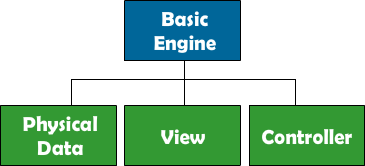
First off, what is a component-based game engine? In a component-based game engine, everything, literally everything, from physical information to AI behavior are represented as individual component. The most elemental unit in a component-based game engine is an entity, say the hero character, an enemy, or a collectable object in the game world. Each entity can have multiple components attached to it, fulfilling the entity’s logical purpose in the game. For instance, a hero character controlled by a player in the game can have: a physical data component, which contains the current position of the character; a view component, which holds a reference to a display object representing the appearance of the character in the game; and a controller component, which listens to player input from the player (keyboard, mouse, etc.) and then updates the physical data component by altering its underlying coordinate data.

Component-Based Game Engine

Systems

Much like entities, the engine itself also contains multiple components with different responsibilities, which are known as systems. The most basic game engine generally consists of four systems: a clock system, which “ticks” every frame in order to keep the engine up and running (basically the clock invokes the main loop every frame); an input system, which listens for player input; an update system, which listens to the input system and update the game logic accordingly; and a rendering system, which draws the game onto the screen based on the current game state.

Dependency Injection

In generally, maintaining the intertwining references in a game engine is a daunting task. For instance, an engine needs to know what systems are added to it, an entity keeps track of its own components as well as needs to access components of other entities sometimes, and a command object needs to hold a reference to the game engine that its command manager belongs to. All this could result in tons of code dedicated to reference management. Making sure every single reference required is passed around correctly and removed as necessary is not easy. Hence, Rusher 2 makes use of SwiftSuspenders, a Dependency Injection framework mostly renowned for playing an important role in Robotlegs, one of the most popular MVC frameworks [...]

Read more: Rusher 2 – Introduction

Thursday, February 17, 2011

Getting started with Ember

Getting started with Ember:

the Game

If your new to entity systems then you may want to read my posts on Game Architecture and Entity Systems first to get an over view. You can download the code for this example here

Ok so first step to making games on the Ember frame work is to create you games main class. This has the same role as an applications context in robotlegs.  Its main role is the initialization and tearing-down of you game.

package{
    import com.tomseysdavies.ember.base.Game;

    public class MyGame extends Game{
        override protected function startUp():void{

        }
    }
}

we can now launch the game from felx like so and pass it a reference to the display object that we want to become the games view.

<?xml version="1.0" encoding="utf-8"?>
<s:Application xmlns:fx="http://ns.adobe.com/mxml/2009"
               xmlns:s="library://ns.adobe.com/flex/spark"
               xmlns:mx="library://ns.adobe.com/flex/mx" minWidth="955" minHeight="600" xmlns:local="*">
    <fx:Declarations>
        <!-- Place non-visual elements (e.g., services, value objects) here -->
        <local:MyGame contextView="{gameView}" />
    </fx:Declarations>
    <mx:UIComponent id="gameView" />
</s:Application>

Components

So our game is now launching and has a reference to its view so we can now look at creating our first component. A component is a value object its highly portable and normal has no methods only data. For this tutorial we will need two.

package components
{
    public class PositionComponent
    {
        public var x:Number = 0;
        public var y:Number = 0;
    }
}
package components
{
    import flash.display.Bitmap;

    public class GraphicsComponent
    {
        public var asset:Bitmap;
    }
}

Entities

Now lets go back to our start up function. So here we first create that our components then next we create an entity and add our components to it. Think of an entity as an empty container to which we can add components. We create entities with the entityManager [...]

Entity Systems

Entity Systems:

Favour composition over inheritance

If you haven’t already read my previous post on the problems of traditional game architecture and why entity systems are needed. I’m going to cover the basics of an entity system before we look at 3 different implantations and the pro’s and con’s of each.

What is an entity?

An entity (sometimes called game object) represents something in the game. For every tree,tank or ninja we have an entity. An entity is container to which we can add components (behaviours) that define what it is. e.g In this rather conceptual example a Ninja gets a Renderer, Physics, Health and Stealth components which together make up a Ninja.
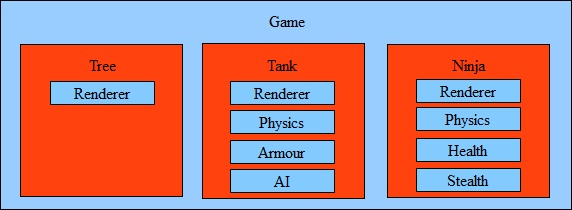
Entity system

This is the basics of all Entity systems one of key feature is the ability to create entities and change there components at run time. So a Ninja could become a Tank! (that’s the hard sell done).

Spotter guide.

There are 3 main ways to implement an entity system I have seen and I’m going to quickly out line them all and take a critical look at the pro’s and con’s. I’m going to call them common, almost and true (yes I’m bias but I think they are appropriate names)

“Common”

Most common implantation you are going to come across. Its based on the strategy pattern and its the simplest to understand. The first time I built a entity system this is what I did. There are good example out there in flash like PushButton Engine.

How it works

All components have a common interface normal with a function update(). Calling update() on entity causes update() to be called on all its components. Components then update there data for example a render component may copy its graphics to a view port.
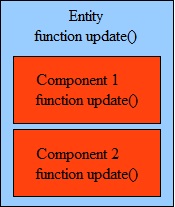
Common Entity system

Pros

Simple and fast. Better than inheritance.

Cons

Scalability and flexibility (how easy it is to make changes). To explain the issue lets take an example. We have an entity with both renderer and physics components. Both need to know about the location of the entity in the world. So we have two options

  1. push the data up into the entity its self.  In complex games this can result inmore and more specialised data gets pushed up into the entity creating a god object.
  2. Allow components to access other components data. When one component depends on the data in another component we get a dependency. Component A can’t function unless component B exists. As a game grows so does the complexity of the dependencies.

There are work arounds to this issue for example automatically creating component B when A is added but then we need to give it the correct data. We start to lose the ability to mix and match components on the fly that makes an entity system so powerful. Entity to entity communication for example in collision detection is also difficult.

“Almost”

[...]