Showing posts with label development process. Show all posts

Monday, April 8, 2013

Tutorial: Debugging Native Extensions

I've written before about how to create your own native extensions for Adobe AIR, but what if you need to debug your extension? If you're doing anything but the simplest of projects, you're going to want to be able to debug the code on the native side, in addition to your AS3 code. The ActionScript side is (hopefully!) already taken care of by your IDE so this tutorial will focus on the native code. It's a pretty short tutorial, but also incredibly useful! For this tutorial, I'm using Visual Studio 2012 Express, which you can get for free from Microsoft and a slightly modified version of the NativeAdd extension from the tutorial linked above. First, you'll want to have your AIR project running. Then switch over to Visual Studio and set a break point (f9 or click the side bar) on the line you want to investigate (shown below). Next, select Debug > Attach to Process from the Visual Studio menu. If you're using Visual Studio 2010 and you don't see this option, first click Tools > Settings > Expert Settings. This will bring up a window with a list of running processes on your PC. In this list find the adl.exe process, select it and click the Attach button. Once the debugger has attached itself to the process, go back to your AIR application and have it call into the native function where you added your break point. In this case, I'm using the NativeAdd extension from a previous tutorial. I modified it a bit so that when the stage is clicked, it calls the doAdd function on the native side. With the debugger attached, when I click the stage, my breakpoint gets hit as shown here: You can now take a look at the values of your native code variables and monitor them as you step through the code using the Visual Studio debugger tools. Here's a sample shot of the watch window with the NativeAdd extension.
[...] Read more: Tutorial: Debugging Native Extensions

Monday, November 26, 2012

Quick Tip: The OOP Principle of Inheritance

This entry is part 6 of 6 in the series Beginner's Guide to OOP

We’ve come a long way in this beginner’s guide to object-oriented programming, discussing the principles of cohesion, coupling, encapsulation, and abstraction. In this final article, we’ll discuss the OOP principle of inheritance and its uses in game development. Note: Although this tutorial is written using Java, you should be able to use the same techniques and concepts in almost any game development environment.

What Is Inheritance?

Inheritance is the principle of class hierarchy. It is the ability for one object to take on the states, behaviors, and functionality of another object. A real-world example of inheritance is genetic inheritance. We all receive genes from both our parents that then define who we are. We share qualities of both our parents, and yet at the same time are different from them. Objects in OOP can do the same thing. Parent classes can have child classes (also known as superclasses and subclasses respectively) which can have the same properties of the parent class, and can define new states, behaviors, and functionality of their own. As an example, consider the following class that could be used as a parent class to different shapes:
public class Shape {
  protected int height;
  protected int width;

  public Shape(int h, int w) {
    height = h;
    width = w;
  }

  public int area() {
    return height * width;
  }

  public int getHeight() { return height; }
  public int getWidth() { return width; }
  public void setHeight(int h) { return height; }
  public void setWidth(int w) { return width; }
}
To extend this class to implement a triangle, it would look like this:
public class Triangle extends Shape {
  public Triangle(int h, int w) {
    super(h, w);
  }

  public int area() {
    return super.area() / 2;
  }
}
Triangle has all the same states and functions as Shape, but redefines the area() function to return the proper area of a Triangle (half base times height). The keyword super is used to reference the superclass and any of its states and functions. This is why we can use super() to call the constructor of the superclass and super.area() to call the area() function of the superclass. So, in this case, super.area() returns height * width. The protected keyword is the last access level modifier. It acts like the private access level modifier but also allows any subclasses to have access to the variable or function.

Why Is It Helpful?

As you can see, inheritance can greatly help reduce code redundancy between similar objects by taking what those objects have in common and putting them in one place. This also creates more maintainable code because it helps to comply with the principle of DRY and to prevent the ripple effect in code changes. If all of this seems familiar, it’s probably because abstraction had very similar benefits (as well as most of the other principles of OOP). Abstraction is closely related to inheritance as an abstracted class can be used as a superclass to create subclasses. The only difference between an abstract class and a normal class is that an abstract class cannot be used to create an object.

How to Apply It

Lets go back to our three games one more time to describe how to apply inheritance.

Asteroids

Recall that we defined an abstract class for moving objects across a screen. Also recall that we defined a Ship class for the ship object. To apply inheritance to Asteroids, we can have the Ship class extend the Movable class as follows:
/**
 * The Ship Class
 */
public class Ship extends Movable {
  /**
   * Function to rotate the ship
   */
  public void rotate() {
    // Code that turns the ship
  }

  /**
   * Function to fire
   */
  public void fire() {
    // Code to fire
  }
}
The code needed to move the ship is taken care of in the Movable abstract class, so we can remove it from the Ship class. All the other objects for Asteroids could also inherit from the Movable class, making it extremely easy to change how to move an object. One thing to note about inheritance is the ability to have multiple inheritance, or the ability of one class to inherit from multiple classes at the same time. Some languages allow it, others do not. Java is one of the languages that does not allow multiple inheritance. Therefore, you couldn’t have the Ship object inherit from both a Moveable class and a Drawable class. Make sure you are familiar with what your programming language allows before you try to design inheritance into your game.

Tetris

Inheritance can be applied to Tetris by having the Tetrimino and all of the game visuals inherit from the Drawable class, which we defined in the last article.

Pac-Man

Recall that for Pac-Man we identified thee objects: Pac-Man, a Ghost, and a pac-dot. Throughout this series we’ve only discussed these three objects and have put off mentioning anything about the last critical piece of Pac-Man: the power pellet. With inheritance, we are now ready to talk about it. A power pellet is a special pac-dot that allows Pac-Man to eat ghosts. Its states and behaviors are exactly the same as a pac-dot, with really the only difference being its size and the ability to blink (remember that to keep the game loosely coupled, we want another class to monitor when a power pellet is eaten and active the changeState() method of the ghosts). This is when inheritance comes in handy. Since a pac-dot and power pellet are practically the same object, we can create a PowerPellet class which extends the PacDot class. The PowerPellet class would just need to modify a few states to make it bigger and add the behavior of growing and shrinking to create a blinking effect. And that’s it – we now have a power pellet with little extra work. Not too shabby. The code for how this would look could be as follows:
Read more: Quick Tip: The OOP Principle of Inheritance

Monday, November 19, 2012

Quick Tip: The OOP Principle of Abstraction

This entry is part 5 of 5 in the series Beginner's Guide to OOP
We’re almost done with this series on object-oriented programming, and in this article we’ll discuss the OOP principle of abstraction – that is, generalising an object – and its use in game development.
Note: Although this tutorial is written using Java, you should be able to use the same techniques and concepts in almost any game development environment.

What is Abstraction?

Abstraction is the principle of generalization. This requires that we move from a specific instance to a more generalized concept by thinking about the most basic information and function of an object.
This may sound a bit strange, but we are already familiar with the concept of abstraction. For example, if I say the word “car”, what do you think of? Odds are we weren’t thinking about the same car. I was thinking about a black Mustang Boss 302, which is a specific instance of a car. Neither of us were wrong because the word car is a very general concept of a vehicle that we use for transportation (or recreation in my case).
The same goes for video games. Video games are categorized into groups such as RTS, RPG, Racing, etc.. These groups are all generalized concepts that describe the gameplay of a game. StarCraft II, Elder Scrolls V: Skyrim, and Need for Speed are all specific instances of these generalized concepts.
Thus, abstraction takes many specific instances of objects and extracts their common information and functions to create a single generalized concept that can be used to describe all the specific instances as one.

Why is it Helpful?

Abstraction is helpful because it strips everything down to its most basic principles. This can help when encapsulating functionality of an object because it can help identify the important information that should be made visible and the unimportant information which can be made hidden.
Abstraction also helps with the Don’t Repeat Yourself principle. By taking what a group of objects have in common and abstracting it, we can help prevent redundant code in each object which in turn creates more maintainable code.

How to Apply This Principle

As before, let’s use our three games to see some concrete examples of this principle in action.

Asteroids

[...]
Read more: Quick Tip: The OOP Principle of Abstraction

Thursday, November 15, 2012

Quick Tip: The OOP Principle of Encapsulation

This entry is part 4 of 4 in the series Beginner's Guide to OOP
We’ve discussed object-oriented programming for game developers in general and the specific OOP principles of cohesion and coupling. Now let’s take a look at encapsulation and how it helps to keep code loosely coupled and more maintainable. Note: Although this Quick Tip is explained using Java, you should be able to use the same techniques and concepts in almost any game development environment.

What Is Encapsulation?

Encapsulation is the principle of information hiding. That is, the implementation (the internal workings) of an object is hidden from the rest of the program. A popular example you’ll hear for encapsulation is driving a car. Do you need to know exactly how every aspect of a car works (engine, carburettor, alternator, and so on)? No – you need to know how to use the steering wheel, brakes, accelerator, and so on. Another example is searching for a value in an array. In Java, you can do the following:
int myArray[] = {1, 2, 3, 5, 7, 9, 11, 13};
Arrays.asList(myArray).contains(11);
The above code will return true if the value 11 is in myArray, otherwise it will return false. How does the contains() method work? Which searching technique does it use? Does it pre-sort the array before searching? The answer is it doesn’t matter because the exact implementation of the method is hidden.

Why Is Encapsulation Helpful?

Encapsulation helps to create code that is loosely coupled. Because the details are hidden, it reduces the ability of other objects to directly modify an object’s state and behavior. It also greatly helps when you must change the data type of a variable. Lets say you decided to use a String to keep track of time in “hh:mm:ss” format. After awhile, you come to realize that an int representing seconds might be a better data type for time. Not only must you change the data type in the object, but also every time you referenced the object’s time in the entire program! Instead, you can use what are known as getter and setter functions. Getters and setters are usually small functions that return and set a variable respectively. A getter function to get the time would look as follows:
public String getTime() {
  return time;
}
The getter will return a String value: the variable time. Now when we want to change time to an int, instead of changing all calls to the getter we can just change the getter function to change the int data type into a String data type.
Read more: Quick Tip: The OOP Principle of Encapsulation

Thursday, November 8, 2012

Quick Tip: The OOP Principle of Coupling

This entry is part 3 of 3 in the series Beginner's Guide to OOP So far in this series, we’ve discussed object-oriented programming in general, and the OOP principle of cohesion. In this article, we’ll look at the principle of coupling and how it helps in game development. Note: Although this tutorial is written using Java, you should be able to use the same techniques and concepts in almost any game development environment.

What Is Coupling?

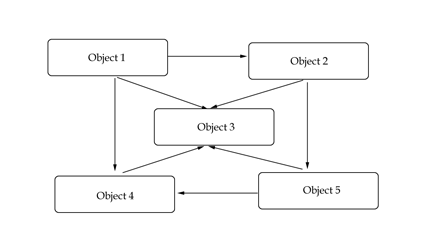
Coupling is the principle of “separation of concerns”. This means that one object doesn’t directly change or modify the state or behavior of another object. Coupling looks at the relationship between objects and how closely connected they are. A Relations Diagram is a great way to visualise the connections between objects. In such a diagram, boxes represent objects and arrows represent a connection between two objects where one object can directly affect another object.
A relations diagram A relations diagram
A good example of coupling is HTML and CSS. Before CSS, HTML was used for both markup and presentation. This created bloated code that was hard to change and difficult to maintain. With the advent of CSS, HTML became used just for markup, and CSS took over for presentation. This made the code fairly clean and easily changeable. The concerns of presentation and markup were separated.

Why Is Coupling Helpful?

Objects that are independent from one another and do not directly modify the state of other objects are said to be loosely coupled. Loose coupling lets the code be more flexible, more changeable, and easier to work with.
A loosely coupled system A loosely coupled system

Objects that rely on other objects and can modify the states of other objects are said to be tightly coupled. Tight coupling creates situations where modifying the code of one object also requires changing the code of other objects (also known as a ripple effect). Tightly coupled code is also harder to reuse because it can’t be separated.
A tightly coupled system A tightly coupled system
A common phrase you’ll hear is “strive for low coupling and high cohesion“. This phrase is a helpful reminder that we should strive for code that separates tasks and doesn’t rely heavily on each other. Thus, low (or loose) coupling is generally good, while high (or tight) coupling is generally bad.

How to Apply It

Asteroids

First, lets look at the objects of Asteroids and how they are connected. Recall that the objects are a ship, an asteroid, a flying saucer, and a bullet. How are these objects related or connected to each other? In Asteroids, a ship can fire a bullet, a bullet can hit an asteroid and a flying saucer, and an asteroid and a flying saucer can hit the ship. Our relations diagram then looks as follows:
The Asteroids relations diagram
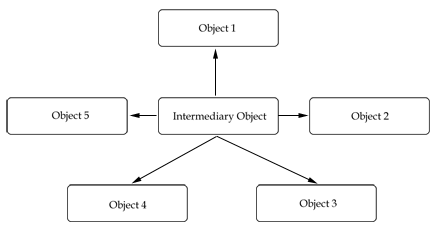
As you can see the objects are all pretty well interrelated. Because of this, we have to be careful of how we write the code, otherwise we will end up with a tightly coupled system. Lets take for example the ship firing a bullet. If the ship were to create a bullet object, keep track of its position, and then modify the asteroid when the bullet hits, our system would be very tightly coupled. Instead, the ship should create a bullet object, but not worry about it after that point. Another class would be responsible for keeping track of the bullet’s position as well as what happens when a bullet hits an asteroid. With an intermediary class in between our relationships, the diagram would look as follows:
Read more: Quick Tip: The OOP Principle of Coupling

Friday, November 2, 2012

Quick Tip: The OOP Principle of Cohesion

This entry is part 2 of 2 in the series Beginner's Guide to OOP
In the first post of this series, we discussed why object-oriented programming (OOP) was helpful for game development, and learned how to identify objects, their states, and their behaviors. In this article, we’ll look at the specific OOP principle of cohesion and how it applies to games.
Note: Although this tutorial is written using Java, you should be able to use the same techniques and concepts in almost any game development environment.

What Is Cohesion?

Cohesion is the principle of being or doing one thing well. In other words, cohesion means grouping together code that contributes to a single task.
A great non-programming example of this principle was covered in one of the first Gamedevtuts+ articles which talked about the Covert Action Rule:
Don’t try to do too many games in one package … Individually, those each could have been good games. Together, they fought with each other.
The same rule applies to object-oriented programming. Each object should only have one responsibility. Every behavior of that object should only do one task. Any more than that and you’ll have a much harder time making changes to the code.

Why Is It Helpful?

Code that is organized by functionality and does only one task is said to have high cohesion. Highly cohesive code is reusable, simple, and easy to understand. It also creates objects that are small and focused [...]
Read more: Quick Tip: The OOP Principle of Cohesion

Thursday, November 1, 2012

10 steps to becoming a better programmer

Hi and welcome back to my blog!
I wanted to cover 10 of the things I’ve learned over the years being a professional programmer that really helped me improve the quality of my code and my overall productivity.

1. Never ever duplicate code

Avoid duplicating code at all costs. If you have a common code segment used in a few different places, refactor it out into its own function. Code duplication causes confusion among your colleagues reading your code, it causes bugs down the line when the duplicated segment is fixed in one location and not the others and it bloats the size of your code-base and executable. With modern languages its become possible to get really good at this, for example here is a pattern that used to be hard to solve before delegates and lambdas came along:
/// <summary>
/// Some function with partially duplicated code
/// </summary>
void OriginalA()
{
 DoThingsA();
 
 // unique code
 
 DoThingsB();
}
 
/// <summary>
/// Another function with partially duplicated code
/// </summary>
void OriginalB()
{
 DoThingsA();
 
 // unique code
 
 DoThingsB();
}
But now we can refactor the shared part of both functions and rewrite using a delegate:
/// <summary>
/// Encapsulate shared functionality
/// </summary>
/// <param name="action">User defined action</param>
void UniqueWrapper(Action action)
{
 DoThingsA();
 
 action();
 
 DoThingsB();
}
 
/// <summary>
/// New implmentation of A
/// </summary>
void NewA()
{
 UniqueWrapper(() =>
 {
  // unique code
 });
}
 
/// <summary>
/// New implementation of B
/// </summary>
void NewB()
{
 UniqueWrapper(() =>
 {
  // unique code
 });
}

2. Notice when you start distracting yourself

When you find yourself flicking to facebook or twitter instead of working on a problem its often a sign that you need to take a short break. Go grab a coffee away from your desk and talk to your colleagues for 5 minutes or so. Even though this seems counter intuitive, you will be more productive in the long run.

3. Don’t rush the solution out the door

When under pressure to produce a solution to a problem, or to fix a bug, its very easy to get carried away and find yourself rushing, or even missing out your usual crucial testing cycle completely. This can often result in more problems and will make you look less professional in the eyes of your boss and colleagues.

4. Test your finished code

You know what your code is supposed to do, and you’ve likely tested that it works, but you really need to prove it. Analyse all the potential edge cases and make a test which confirms that your code performs as expected under all possible conditions. If there are parameters, send values outside of the expected range. Send null values. If you can, show your code to a colleague and ask them to break it. Unit testing is a formalised approach to this.

5. Code review

[...]
Read more: 10 steps to becoming a better programmer

Tuesday, October 9, 2012

How to make a multi-player game – part 1

Hello and welcome back to my blog!
Its been a while since my last post, this is because I’ve been working on a multi-player game, called mmoAsteroids which you can play by clicking on the icon on the side-bar. This post is my attempt to crystallise the most important points I’ve learned during the making of this game and my other multi-player prototypes.

Click here to view the video on YouTube.

Introduction

Firstly, it’s important to identify what I mean by multi-player and what implications that has. I’m talking about non-local multi-player, over the internet rather than at the same computer.
Of course this means there needs to be some kind of way for the players to communicate with each other over the internet. I’ve chosen the server-client model rather than peer-to-peer, because that’s what my target platform client, Adobe Flash supports.

Client side

Why choose Flash? Because:
  • The install base is massive, even compared to HTML5
  • It’s a fixed platform, you don’t need to worry about different browsers, or different hardware
  • The Flash portals are an amazing resource for distributing games
  • There are very mature development environments available which support full debugging via the world class Visual Studio
  • It has support for TCP sockets built right in

Server side

Because I’m using the client-server model, I need to choose a platform for the server-side code.
I’ve chosen node.js for this article, simply because it’s the fastest way to get a decently performing server set up and running with the least amount of code. Also, with your own server there are no limits on the number of clients you can support simultaneously, unlike ready made packages like player.io, or SmartFoxServer which limit you to a certain number of users until you sign up to their paid plan.
Of course, they provide a lot more features for that money as well; it’s important to weigh up the costs and benefits of whatever platform you choose.

Client-server model

How do server-client based multi-player games work?

Briefly, the client and server communicate by sending messages to one another. The client might send a message to the server saying he wants to move forwards. The server will receive the message and react accordingly. The server might send back a message saying that the player collected a power-up, or that someone else has joined the game.
The client and server both maintain a copy of the game universe; the server has the master copy and then client has a (possibly partial) copy for local simulation and display purposes. The server has authority over all the important decisions in game, like players getting hit by bullets, or being killed, or levelling up. The client has authority about what keys are being pressed and other pieces of user input data.
The reason for this separation of authority is to prevent cheating; although this is only really something you need to worry about once your game is big enough for hackers to invest time in finding cheats, it’s worth taking simple steps ahead of time to prevent the possibility of a hacked client from, for example, transmitting that he killed everyone in the world to the server, or something of that nature.
Having the server be in authority simply prevents this from being possible.

WoW recently suffered from hackers exploiting the system

MMO? MO?

It’s important to distinguish between the various types of multi-player game before we get into this too deeply, because the type can have a massive effect on the amount of code you need to write.
Starting at its simplest form, I’m going to define an MO or Multi-player Online game as a multi-player game supporting as many players as possible running on one server (a physical computer located on the internet somewhere).
An MMO is a Massively Multi-player Online game. There are many different forms this can take, but nearly all of them will involve more than one physical server working together to handle the huge load that ‘massively’ implies.
How they work together will define how the game is to be designed; for example you might want your game universe to be shared by all players at the same time, as in Eve Online; this requires that several servers work together to form a large shard to share the load. Or you might want to instance your universe so that each individual server actually holds a unique copy of the universe and players in one universe cannot see players in another, like Realm of the Mad God. Or yet again, maybe you want to have some kind of combination of the two, where the universe is split up into realms and players cannot see players in other realms but they can travel between these realms, like in World of Warcraft [...]
Read more: How to make a multi-player game – part 1

Saturday, June 9, 2012

Run your Flash apps in Xcode iOS Simulator with AIR 3.3

Flash apps in Xcode iOS Simulator with AIR 3.3
AIR 3.3 adds a new feature to preview and debug your apps directly in iOS Simulator that is part of Xcode on Mac. This rapidly speeds up testing and preview of an app or a game especially when you use native extensions.
[Download AIR 3.3 SDK]
Simulator support is not yet part of the Flash Builder, but you can already use it via command-line:
Compile for iOS Simulator
There two new options available with adt for iOS Simulator compilation:
1) ipa-test-interpreter-simulator (for testing)
2) ipa-debug-interpreter-simulator (for debugging)
PATH_TO_AIR33SDK/bin/adt -package
-target ipa-test-interpreter-simulator
-provisioning-profile DEMO.mobileprovision
-keystore CERTIFICATE.p12
-storetype PKCS12
-storepass PASSWORD FINALAPP.ipa DESCRIPTOR.xml APP.swf


Read more: Run your Flash apps in Xcode iOS Simulator with AIR 3.3

Friday, February 3, 2012

HOWTO: Join multiple SWF files into one with AIR for iOS

A while back, I promised to write some of the backstage tips that made it possible for Machinarium (1 GB sources!, 28 SWFs!) to run on an iPad with AIR, which requires only a single SWF.

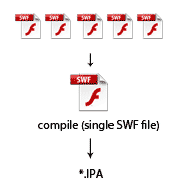
One of the issues you run into is how to join/concatenate 28 SWFs into single SWF. I wrote an article about using SWC libraries for that here Compiling big Flash/AIR projects with lot of SWFs for iOS. This sometimes works, but very often the workflow is more complex and you want to keep the same SWF files for Android and iOS and use them at least in a bit similar way. On Android you can however load SWF files at the runtime and this is very effective for the memory usage. On iOS you have to watch this, especially when you have everything in a single SWF. So, ideally you place all assets into separate files and load them and dispose them on-demand. But that’s more of a general problem you should keep in mind – every asset that doesn’t contain AS3 (pictures, videos, music), put aside. But back to the topic.

Now comes the magic by David ‘Oldes’ Oliva (the lead developer of Machinarium) from Amanita Design, who made it all possible and wrote a script which can be used for joining SWFs together.

Note: This solution allows you to use multiple SWF files containing AS3 script and logic in each of them, not only for assets. That’s why it’s so powerful.

*prerequisite: you’ll need to understand how to work with the command-line on Mac or Windows.

Steps:

1) Prepare SWFs like you were using them the standard way, but instead of loading them dynamically via the Loader class, SWFLoader or a similar mechanism, each SWF has to be Class (or contain at least one, can contain more), which you can instantiate. That’s because once you join all SWFs together, you will be instantiating it’s contents, not loading.

2) Download the samples package rswf-join-example.7z (for unzipping use 7-zip compatible tool)

3) Download the REBOL script view environment http://www.rebol.com/download-view.html

Using the tool:

4) Navigate to the samples folder. There are three scripts that you might want adjust to fit your workflow:

compile-and-run.r
- this is the rebol script that does part of the job and runs Game.bat

Game.bat
- here you want to adjust the path to your Flex/AIR SDK so it points to the adl command

Red more: HOWTO: Join multiple SWF files into one with AIR for iOS

Tuesday, May 3, 2011

Game Design Logs

If you still practice or encourage the outdated practice of writing long design documents, you are doing your team and your business a grave disfavor. Long design docs embody and promote an insidious world view: They make the false claim that the most effective way to make a game is to create a fixed engineering specification and then hand that off to developers to implement feature by bullet-pointed feature.

Great game development is actively harmed by this assumption.  Pre-allocating resources at an early stage interrupts the exploratory iteration needed to find the fun in a game. A written plan that stretches months into the future is like a stake through the heart of a good game process. Instead of quickly pivoting to amplify a delightful opportunity found during play testing, you end up blindly barreling towards completion on a some ineffectual paper fantasy.

Yet, there is still a need for documentation.  Why?

  • We need a persistent repository of decisions: Teams include many people and conversation occurs asynchronously.  Without centralized documents, you end up with a fragmented conversation where many decisions made in one-on-one conversations are lost to the broader team forever.   
  • We need a shared vision: Documents also helps forge a common vision of the next iteration.   In a situation where everyone has strong and varied opinions, it is essential that someone can lead the team to by unambiguously stating what comes next.  Apparently even God needed documentation. 

Design logs

What I do now is write a little something I call a 'design log.' Game design is a process of informed iteration, not a fixed engineering plan that you implement.  The form of your design documentation should flow from this philosophy [...]

Read more: Game Design Logs

Tuesday, April 5, 2011

User stories, pseudocode and agile development

User stories, pseudocode and agile development:

The first steps of a project are always the most amazing because it’s when we start to understand customer needs and when the first top-level analysis is done.

The output of these steps usually is a bunch of top-level stories, a clear vision about the goals of the project and plan driven by customer priorities. This is usually just enough to start the development life cycle of the application.

The first question every application development effort faces is “Where to start?”.

Wednesday, February 23, 2011

How to make a whole game in one day

How to make a whole game in one day:
There are game jams and Flash game competitions seemingly every weekend these days. While I don't really like the idea of pinning my eyes open with matchsticks and coding all night, I do like the idea of getting a complete game finished and released in a single day. I sometimes get a day or two of downtime between client projects, and rather than using this time to experiment on bunnies, I've been trying to work out how feasible it is to release 1 or even 2 games in these gaps.

My first couple of attempts have overrun by about double, and still aren't released (I'll keep you posted), but I have learned a few things along the way that I thought were worth sharing. I've also picked the brains of some other friendly developers for some suggestions (you know who you are, so thanks!)

Here's what I've worked out so far:
  • The game can't have more than 1 level that you need to design. So a single maze like Pacman would be ok, but you can't have every level be different.
  • You can't require any complex artwork. You need to use either free art, cheap stock art, art you already have kicking around, or art you can put together in 1 or 2 hours.
  • You need a game engine to start off with. Flixel and Flashpunk might work for you, but I prefer to use my own engine, which I have been revising and improving for well over a year. It's still nowhere near 'finished', but I'm not writing much low-level code for each new game.
  • You need a template .fla and/or FlashDevelop template already set up so you don't have to write any boilerplate for Mochi-ads, screen management, preloading etc
[...]

Monday, February 21, 2011

MochiLand: Islands of Empire: A Post-mortem

MochiLand: Islands of Empire: A Post-mortem:

my name is jay, this is my game
Hi, my name is Jay and I work at Mochi Media.  Islands of the Empire was the first (and only) game I have made.  So one day I was messing around with Flash and built this really cool map engine using Pixel Bender and was like, “Damn, I’m gonna build a game.”

URL: http://armorgames.com/play/10238/islands-of-empire
Source: http://github.com/jaybaird/Islands-of-Empire
Total Time: 18 months. :(

Step 1: Tech Demo != Game

July, 2009

My game, as it started out, was nothing but a tech demo. I wanted to see the interactions of Pixel Bender with different settings and filters to see if I could output little blobs of terrain on the screen. When I fired it up and out came the pretty pictures, I was sold. I was going to make this game.

A quick aside: I’ve been wanting to make games since, oh, about forever ago.

So where do we go from here? I’ve got islands. Do I make a game like Civilization? Risk? A long time ago I had aspirations to build something like Black & White and visions of awesome A-Life simulations and magic spells and wars and ships. Oh! Ships. I’ve got islands, let’s go nautical! What kind of boat games are there? I was drawn to Uncharted Waters and other games of the genre, even going so far back to Seven Cities of Gold. Then, over beers one night I was talking to Bob (yes, that Bob when I realized I wanted to see a nautical themed Galcon clone. That was it I decided. Galcon it is.

Step 2: Making Games is Fucking Hard

September 2009 – April 2010

Don’t worry too much about the language, cause for reals, this shit is hard. You guys impress the hell out of me day after day with what you’re able to do. So I had a map engine, I had a game design idea. Now it’s time to take the ball and run in for a touchdown, right?

No. Turns out I can make pretty graphics programmatically, but I suck at art. Ok, easy fix. I work with some of the most talented people ever so how do we solve this problem? We bribe Mr. Shen! Shen did an amazing job on all the in-game assets and I’m over the moon with the final look and feel. Shen. Is. Awesome. But you guys all know this.

So, once the art is out of the way, I start coding like mad in my spare time. I’m going crazy with Galcon style setups and balancing and grouping ships and having ships shoot at one another. That’s when the first bog hit. This game isn’t fun. It’s hard to control. The premise is shaky and I’m a terrible story teller, so I can’t talk my way out of this one. What to do. Hmm, I know! I’ll make an RTS! I’ve always wanted to write a pathfinder!

So I go down some awesome AI rabbit holes, I implement pathfinding, formations, blackboards and all sorts of fun stuff but never actually work on a game. This sinks in slowly. Co-worker and friend Bryon begins to only refer to the game as “the Tech Demo.

Step 3: There’s a Light On…

April 2010 – August 2010

[...]

Tuesday, January 11, 2011

SWFSheet – create sprite sheets from SWFs

SWFSheet – create sprite sheets from SWFs:

SWFSheet is a program I created in most of a day back in late December. I finally polished it up this week and it’s now ready for release. The idea is to take an animation created in Flash, and generate a sprite sheet from it. A sprite sheet, for those of you who may not be familiar, is a single large bitmap containing several frames of an animation, usually layed out in a grid. These can be loaded in very efficiently by games, and each frame shown to recreate the animation.

I had the idea for this program while attempting to port some Flash stuff to the iPhone. And later while making other mobile games, I found that Flash was still the best tool to create animations. It has a powerful time line, easy to use drawing tools, tweens, 3D, and of course, powerful scripting with ActionScript. However, getting a nice looking Flash animation into a sprite sheet that could be used with cocos2d on the iPhone/iPad or with XNA for Windows Phone 7 was not so easy. I did it by hand a couple of times, and it wasn’t very fun. Thus, SWFSheet was born.

SWFSheet is an AIR application and has been tested on Windows and Mac. You create your SWF however you want. Flash CS5 or earlier, Flash Builder, or anything else that outputs a SWF. It doesn’t matter how it’s created. Then you load the SWF into SWFSheet [...]

Wednesday, January 5, 2011

Making a Flash game like Plants Vs Zombies – step 2

Making a Flash game like Plants Vs Zombies – step 2:

In the second part of the series, it’s time to raise money to buy a plant.

Also, we should add a smooth animation to falling suns, fix a bug which made them appear only on certain tiles and make them disappear if they aren’t picked up after a given amount of time.

Fixing the bug on newSun function

As reported by some readers, newSun function had a bug which did not allow to make the sun appear on every tile. It can be fixed assigning the x property this way:

sun.x=52+sunCol*65;

but since we are featuring smooth animation to falling sun, the entire newSun function can be changed this way:

private function newSun(e:TimerEvent):void {
 var sunRow:uint=Math.floor(Math.random()*5);
 var sunCol:uint=Math.floor(Math.random()*9);
 sun = new sunMc();
 sun.buttonMode=true;
 sunContainer.addChild(sun);
 sun.x=52+sunCol*65;
 sun.destinationY=130+sunRow*75;
 sun.y=-20;
 sun.addEventListener(MouseEvent.CLICK,sunClicked);
}

Now y property is set at -20 to make the sun appear outside the visible area, and its final y destination is saved in a variable called destinationY. We’ll see later what to do with it. Also notice the buttonMode property to make the mouse pointer change shape when it’s over the sun.

Collecting suns to raise money

First, we need a new variable to store the amount of player’s money, then we need a text field to display it somewhere. We also need Event and TextField classes to handle frame events and create on the fly text fields.

So these are the libraries we need to import in the package: [...]

Wednesday, December 29, 2010

Making a Flash game like Plants Vs Zombies

Making a Flash game like Plants Vs Zombies:

As promised in fully explaining a PopCap game post, here we go with Plants Vs Zombies.

Plants vs Zombies

I have to say I am not a great PvZ player (shame on me), so if you notice something wrong during the series, let me know.

Defining the main structure of the game

PopCap did a great look and feel job with PvZ as defending your house from brain eater zombies has a great appeal… and all in all killing zombies is fun, as confirmed by blockbuster like Resident Evil, Left 4 Dead and Dead Rising. But this has nothing to do with the gameplay, which could be Butchers Vs Plumbers, Pigeons Vs Camels or Circles Vs Squares.

During the series, good circles will prevent evil squares to get to the base. Also, the structure of the game field can be simplified in a tile based game [...]

Tuesday, December 28, 2010

Rapid Implementation (UAV Game)

Rapid Implementation (UAV Game):

Earlier this month, Remy Karns, a student at UC Berkeley, called me for help with implementing his 3 page design document.

7 hours later, I had UAV Game made based on his spec (play in Flash, no download/install required). UAV is short for Unmanned Aerial Vehicle.

I wrote an article about this game for the Newsgames Blog that will go online soon, though that one has a journalism angle. In contrast – and fitting with this blog’s purpose – this post instead focuses on the game’s rush development.

Foundation Code

Rather than memorize the details of how to handle keyboard/mouse input, basic graphics, sound playing, and framerate timers in each programming language, I prefer to start with a source file that’s little more than an image being loaded and shown, a sound being loaded and played, and a little input being taken, so I can duplicate and rearrange. In this case, I started from the example code that I put together for ActionScript 3 – Motion Tutorial, removing aspects I wouldn’t be needing.

Isometric

In order to make isometric building art, I turned on the grid in my image editor, then drew using diagonal lines that went 1 tile vertically for every 2 horizontal tiles.

That 1:2 ratio works since sin(30 degrees) = 0.5. The simplicity of this is part of what makes isometric a popular way to fake 3D.

Likewise, for the moving AI targets, I set their vertical movement to only have their horizontal speed. For the burnt crater graphic that gets drawn after the explosion, I first draw a circle from overhead, then scaled it to half height.

For distance checks, such as determining which guys are within the blast radius, I doubled the Y offset [...]

Sunday, December 19, 2010

Hot Failure: Tuning Gameplay With Simple Player Metrics

Hot Failure: Tuning Gameplay With Simple Player Metrics: "

In this article taken from Game Developer magazine's September 2010 issue, Google game developer advocate Chris Pruett describes how he quickly and cheaply implemented useful metrics into his Android game, Replica Island [...]

Friday, December 17, 2010

Pirates Love Daisies HTML5 Game Launches!

Pirates Love Daisies HTML5 Game Launches!: "

I’m extremely excited to announce the launch of one of our recent projects: Pirates Love Daisies!

Microsoft approached us a few months ago and asked to work with us to build a best of breed tower defense game in Javascript and HTML5. I was a bit hesitant at first – it’s been quite awhile since I worked with JS and HTML in any great depth, and most of my memories were of fighting browser incompatibilities and cursing the lack of decent developer tools. However, we did some quick code spikes to get a feel for what was possible and decided that this was a great opportunity to gain some applied experience with a new technology while working on a fun project.

Concept
We teamed up with local illustration group Pulp Studios and started brainstorming ideas for the theme of the game. Fairly early on we latched on to the idea of pirates (I mean really, who doesn’t like pirates!), but we needed something for them to defend. We considered going with the typical tower defense model, and simply have the user prevent creeps (enemies) from getting from point A to point B, but I’ve never liked that narrative. What exactly is at point B that’s so important?

We decided that the creeps were out to steal something valuable from the pirates, but we weren’t sure what that should be. Gold was an obvious choice, but it was boring, and it made more sense as the currency for purchasing units and upgrades. Then it hit us… Daisies!

Why daisies? Because Pirates Love Daisies, of course. The fact that daisies are visually iconic, seemed to be appropriately fun and quirky, and would work well aesthetically may have factored in as well.

With the illustrators working on sketches, we got down to writing code [...]