Showing posts with label ios. Show all posts

Thursday, December 13, 2012

Creating a Custom Virtual Keyboard

Although AIR for iOS offers access to the iOS virtual keyboard, you have limited control over the type of keyboard that appears. If you want additional keyboard configurations within your Flash project then you’ll need to build your own custom keyboard component. Although this will require some development effort it will allow you to tailor the user experience. For certain apps such as games, you may actually find a custom keyboard is the preferred option, as it will better fit your visual design.
Let’s see how to create one using Flash.
Flash iOS Apps CookbookThis tutorial is a previously unreleased recipe from Flash iOS Apps Cookbook and supplements the content found in Chapter 7, Working with Text and the Virtual Keyboard.
Flash iOS Apps Cookbook provides the recipes required to build native iOS apps using your existing knowledge of the Flash platform. Whether you want to create something new or simply convert an existing Flash project, the relevant steps and techniques are covered, helping you achieve your goal.

Getting Ready

An FLA has been provided as a starting point.
Download this recipe’s accompanying source bundle and open chapter7/recipe8/recipe.fla into Flash Professional.
The visuals for this application have already been created. Sitting on the stage is a virtual keyboard and a dynamic text field. The text field will be used to output what the user types.
The dynamic text field has been named field while the movie clip instance that represents the virtual keyboard has been named keyboard.
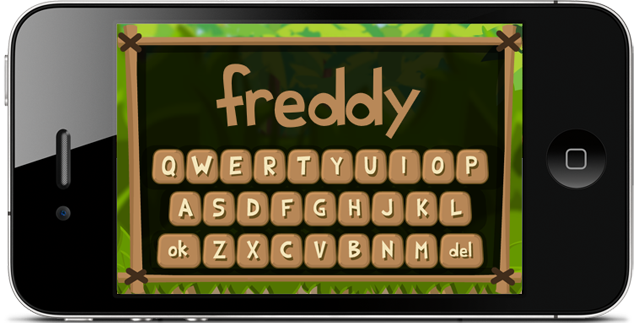
Entering a player's name with a custom virtual keyboard.
With the Selection tool (V) selected, double-click on the keyboard instance to examine its timeline. The keyboard contains 28 keys – 26 for the letters of the alphabet, an ok key for when the user is finished typing, and a del key to delete a character. You’ll find that each alphabetic key is represented by its own movie clip and that the instances are named a_key to z_key. This naming convention makes it easy to determine the letter that a key represents by simply examining the first character of its instance name. The remaining two keys have instance names of ok_key and del_key. Additionally there’s a movie clip named surface that sits beneath the keys and represents the keyboard’s body.
Double-click on any one of the keys to examine its timeline. Each is represented by two frames, where the second frame will be shown when the key is being pressed. The movie clip symbol for each key is linked to a class named Button, which was introduced in the Handling user interaction recipe from Chapter 4. Open Button.as and familiarize yourself with the code.

How to do it…

Perform the following steps.
From Flash, select File | New and create a new ActionScript 3.0 class. Name it VirtualKeyboard.
  • Add the following ActionScript to the class:
    [...]
    Read more: Creating a Custom Virtual Keyboard
  • Friday, October 19, 2012

    Stage3D compressed textures – Introducing the ATF SDK

    We introduced Stage3D last year and the momentum behind has never stopped growing but there is one area we did not give all the details. The ATF file format, it is mentioned here and there, so what's up with this? Some of you may have seen it in the documentation for Stage3D referred as the compressed texture file format, but we never shared any tools to create those famous ATF textures.
    Before we package the ATF tools with the AIR SDK, I am happy to share here in advance the ATF tools so that you guys can start leveraging the ATF format now!
    So what is it?
    First, let's start by talking about what compressed textures are.
    When doing GPU programming with any technology, you have two options for how you handle your textures. You can go compressed or uncompressed, very simple. So, what is the difference?
    1. When using uncompressed textures, a good old uncompressed file format like PNG is used and uploaded to the GPU.
    2. Because GPUs don't support such a file format natively, your texture is actually stored in CPU memory, when it could actually be stored on the GPU memory!
    3. Same thing applies for JPEG images, make no mistake, graphics chipsets don't know anything about JPEG which would also be decoded on CPU memory.
    4. Of course, each platform has different support for compressed textures depending on the hardware chipset being used.
    Now get ready for the fun! Here is below a little table to illustrate it:

    PlatformFormat
    ImgTech (iOS)PVRTC
    Qualcom (Android)ETC1
    Mali (Android)ETC1
    NVidia (Android)ETC1/DXT1/DXT5
    Android (PowerVR)PVRTC/ETC1
    WindowsDXT1/DXT5
    MacOSDXT1/DXT5


    Why ATF?
    As you can imagine, if you would develop a game targeting iOS, Android and desktop, you would need to supply your textures compressed to each format for each platform. Which would look like this:
    1. leaf.png encoded to DXT for Windows and MacOS
    2. leaf.png encoded to ETC1 or DXT for Android (Nvidia)
    3. leaf.png encoded to PVRTC for iOS (ImgTech)
    Of course it is a pain to provide all the different versions of the textures, detect at runtime which platform you are running on and upload the corresponding texture. Wouldn't it be cool if you could just rely on one single container, that would wrap all the textures for each platform and Flash Player or AIR would extract automatically the texture required depending on the platform? So here comes ATF.
    The ATF internals
    Really, think about the ATF format as a container for lossy images. Here is below a little figure showing very sinply the structure of a default compressed ATF file:
    Read more: Stage3D compressed textures – Introducing the ATF SDK

    Wednesday, June 20, 2012

    Adobe Shadow Labs Release 3

    Last week the Shadow team hit another milestone: Release number 3. You can go to Adobe Labs and get the latest version and to the application stores (iTunes Store, Google Play, Android Market, and Chrome Web Store). It is important to remember that in order to get your app updated you have to update all the parts (the desktop app, the Chrome extension, and the iOS/Android apps). If you are new to Shadow, then let me tell you what it is. Shadow help you with testing your mobile websites or web pages on iOS and Android devices. How? On short it saves you time. Lot of time. You can enjoy syncronized browsing (the mobile devices display automatically the same URLs you have on your desktop browser), remote web inspector session with any one of the connected mobile devices, and work with localhost URLs to name just a few. So what’s new in the latest release? Here is the list:
    • Screenshots – you can take screenshots of the current page for the connected devices
    • Cache management – you can be sure that the cache was cleared on the devices
    • SSL support – you can use unsigned SSL certificates during development
    Here you can watch a video that walks you through these new features.
    Read more: Adobe Shadow Labs Release 3

    Saturday, June 9, 2012

    State Machine for Continuous Movement: Desktop, iPad, iPhone

    Heli iPadCovering the Bases
    On the HTML5 side of the world, most developers/designers have been aware that when you make a site, you need to consider the different environments used to view your site. With Flash and AcitonScript 3.0, there’s a new dichotomy: Web and App. Because mobile devices like smart phones and tablets will not display Flash, it’s pretty much a decision to create a mobile app or to try and do the animation with JavaScript and related technology (e.g., jQuery). As more and more users have mobile hardware, the Web is a funny place. Apps are so much handier than any Web-based app that given the choice, I’ll use a device-based app. The reason is simple: you’re not always within range of a wifi. That’s it. No wifi; no working app. So in sticking with Flash and AS3, I am thinking in terms of the following:
    • Desktop: Standard Flash
    • Table: Mobile Flash Based App
    • Phone: Mobile Flash Based App
    Having recently got an iPad 3, I’ve been able to compare the results on it with my iPhone and desktop. Basically, the tablet is right between the two in terms of performance. Using Flash Pro CS6 to develop a revised version of the Aid Game, I was able to create versions for the iPhone and iPad as well as a desktop version. You can play the desktop version on a non-mobile device and play the mobile versions on mobile table and phone devices. Click the buttons below for desktop Play or download all of the versions, including versions for Flash CS5 and Flash CS6.
    Read more: State Machine for Continuous Movement: Desktop, iPad, iPhone

    Run your Flash apps in Xcode iOS Simulator with AIR 3.3

    Flash apps in Xcode iOS Simulator with AIR 3.3
    AIR 3.3 adds a new feature to preview and debug your apps directly in iOS Simulator that is part of Xcode on Mac. This rapidly speeds up testing and preview of an app or a game especially when you use native extensions.
    [Download AIR 3.3 SDK]
    Simulator support is not yet part of the Flash Builder, but you can already use it via command-line:
    Compile for iOS Simulator
    There two new options available with adt for iOS Simulator compilation:
    1) ipa-test-interpreter-simulator (for testing)
    2) ipa-debug-interpreter-simulator (for debugging)
    PATH_TO_AIR33SDK/bin/adt -package
    -target ipa-test-interpreter-simulator
    -provisioning-profile DEMO.mobileprovision
    -keystore CERTIFICATE.p12
    -storetype PKCS12
    -storepass PASSWORD FINALAPP.ipa DESCRIPTOR.xml APP.swf


    Read more: Run your Flash apps in Xcode iOS Simulator with AIR 3.3

    Thursday, May 31, 2012

    Tune your AIR for iOS development skills: compile, install and profile like a pro

    The purpose of this article is to share with you some tips, that might help you to speed up and improve the process of building AIR for iOS apps. These are the practices that I use every day and hopefully some of you will find them useful.

    Installing an app (*.IPA) on your iOS device

    As a developer you want to save time, being able to install apps on the device quickly and see the results is the most important thing. Using iTunes for app install has some drawbacks: you will have to synchronize it and it takes lot of time and you cannot install apps on devices that are not synchronized with your iTunes (like friend’s iPad).
    There are three ways I find quicker:
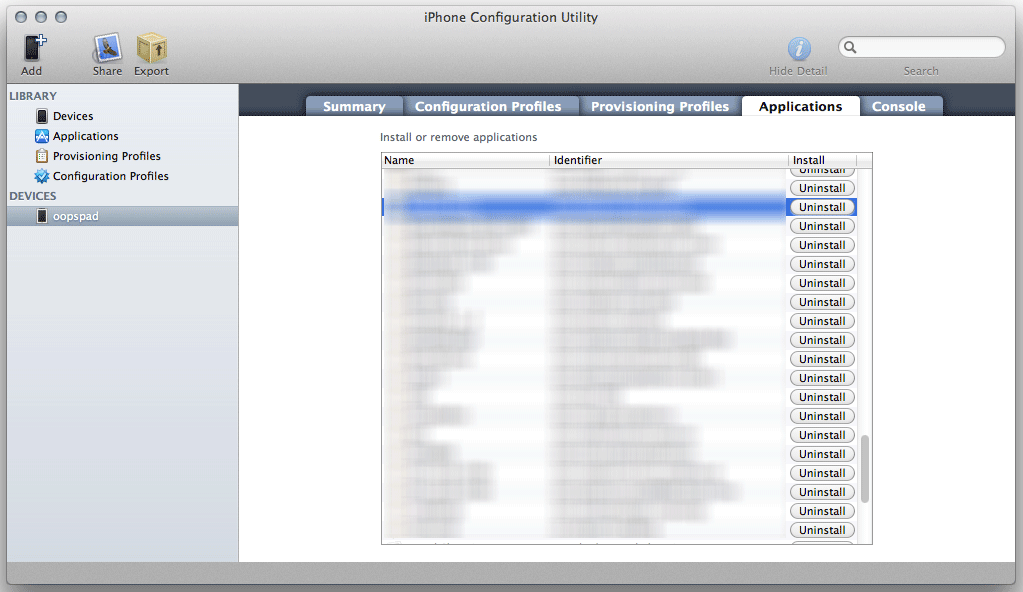
    iPhone Configuration Utility
    Available for Windows and Mac from Apple, this smart piece of software helps you to manage apps installed on your devices. Drag and drop IPA file to Applications and then choose a device and install or uninstall specific apps. Works for iPad as well. You can also manage configuration and provisioning profiles.
    Download for Windows | Download for Mac
    iPhone Configuration Utility
    Xcode Organizer
    Read more: Tune your AIR for iOS development skills: compile, install and profile like a pro

    Friday, February 3, 2012

    HOWTO: Join multiple SWF files into one with AIR for iOS

    A while back, I promised to write some of the backstage tips that made it possible for Machinarium (1 GB sources!, 28 SWFs!) to run on an iPad with AIR, which requires only a single SWF.

    One of the issues you run into is how to join/concatenate 28 SWFs into single SWF. I wrote an article about using SWC libraries for that here Compiling big Flash/AIR projects with lot of SWFs for iOS. This sometimes works, but very often the workflow is more complex and you want to keep the same SWF files for Android and iOS and use them at least in a bit similar way. On Android you can however load SWF files at the runtime and this is very effective for the memory usage. On iOS you have to watch this, especially when you have everything in a single SWF. So, ideally you place all assets into separate files and load them and dispose them on-demand. But that’s more of a general problem you should keep in mind – every asset that doesn’t contain AS3 (pictures, videos, music), put aside. But back to the topic.

    Now comes the magic by David ‘Oldes’ Oliva (the lead developer of Machinarium) from Amanita Design, who made it all possible and wrote a script which can be used for joining SWFs together.

    Note: This solution allows you to use multiple SWF files containing AS3 script and logic in each of them, not only for assets. That’s why it’s so powerful.

    *prerequisite: you’ll need to understand how to work with the command-line on Mac or Windows.

    Steps:

    1) Prepare SWFs like you were using them the standard way, but instead of loading them dynamically via the Loader class, SWFLoader or a similar mechanism, each SWF has to be Class (or contain at least one, can contain more), which you can instantiate. That’s because once you join all SWFs together, you will be instantiating it’s contents, not loading.

    2) Download the samples package rswf-join-example.7z (for unzipping use 7-zip compatible tool)

    3) Download the REBOL script view environment http://www.rebol.com/download-view.html

    Using the tool:

    4) Navigate to the samples folder. There are three scripts that you might want adjust to fit your workflow:

    compile-and-run.r
    - this is the rebol script that does part of the job and runs Game.bat

    Game.bat
    - here you want to adjust the path to your Flex/AIR SDK so it points to the adl command

    Red more: HOWTO: Join multiple SWF files into one with AIR for iOS

    Thursday, April 7, 2011

    SWFToPNG

    SWFToPNG:

    SWFToPNG is a tool to export Flash assets to PNG. It automatically renders out the symbols in a SWF to a series of PNG files, and optionally crops out the transparent bits around the edges as well as retaining the registration points of the items.

    Some useful information:

    • This only works with AVM2 SWFs, so that’s Flash 9 player and higher with AS3
    • It will only understand MovieClips on the timeline (no buttons!) and they must be exported for ActionScript for the filenames to be correct (this is easy enough to do with a few clicks in the Flash IDE).
    • The program is memory-intensive. A bitmap is created for each frame of the SWF and held in memory until the files have been written (it was designed this way to facilitate cropping and quick development; it’s not intended as an export utility for your ten minute animations!)
    • Timeline code that causes clips to loop infinitely will also cause the rendering to loop infinitely.

    Thursday, March 3, 2011

    Apple iPad 2 Review: In Depth Analysis

    Apple iPad 2 Review: In Depth Analysis:

    Apple iPad 2 Review

    Yesterday the Apple iPad 2 was released at the Yerba Buena Center for the Arts in San Francisco. Steve Jobs himself officially presented the new tablet.  Now as things have settled down a bit, here is an Apple iPad 2 Review, with an in-depth analysis of the key features.

    Apple iPad 2 Review

    Apple iPad 2 Has  A Performance Boost With Dual-Core A5 Chip

    Apple iPad 2 A5 Chip

    This A5 chip obviously makes the Apple iPad 2 twice faster than its predecessor, while it also touts up to 9X better graphics.

    Apple iPad 2 Review: Light Weight & Slimmer

    Apple iPad 2 Slimmer Then Original iPad

    It was also previously rumored that the Apple iPad 2 will be slimmer and considerably lighter than its predecessor. Well, that’s true, as Steve Jobs told the audience about its dimensions. The iPad 2 is around 33% thinner than the previous Apple tablet. The width of the Apple iPad 2 is only 8.8mm down from 13.4mm. It is even slimmer than the iPhone 4!

    Apple iPad 2 Comes In Both Black & White Colors

    iPad 2 White

    Some users like it white and someothers like it black, so Apple decided to design the iPad 2 in both colors. The audience at the event was so really excited when Steve Jobs announced that the white iPad 2 will be shipped from the very same day than the black iPad 2, meaning that there will be no delay in the delivery of the white iPads.

    Front Camera Confirmed in Apple iPad 2

    Apple iPad 2 Front Camera

    The previous iPad did not have a front camera, so there was no video conferencing capability, but the face camera has been confirmed for the Apple iPad 2.

    Back-Camera Records 720p HD Video

    The back camera is able to record 720p HD videos. This is a great improvement in Apple’s tablets [...]

    Saturday, January 22, 2011

    Corona SDK, a short stack

    Corona SDK, a short stack:

    One of the elements that I most like about Corona SDK is that it is built atop a short but solid stack. Here are the elements:

    Corona SDK Parts:

    • Lua 5.1 Interpreter – 110Kb interpreter
    • OpenGL ES 1.1 and 2.0 – The graphics hardware acceleration standard
    • Native Libraries – Injected at compilation depending on the platform
    • Not a ounce more!!!

    The Lua 5.1 interpreter is written in C and is thus highly portable. It has been widely adopted within the gaming industry given it’s tiny footprint. The entire interpreter + vm + systemlibs + gc + coroutines + data types are implemented in ~110Kb and there are extremely few platforms where Lua doesn’t run today.  Given the footprint, it is easy to embed the entire interpreter within an application where the result with graphics and logic outputs a file 300Kb at the low end. As the entire vm is embedded within your application, you are only a compile away from adding in the latest features. Lua also brings in 10+ years of portable libraries to choose from LuaRocks, Lua-users Samples, and if you are really interested full source for the VM is openly available.

    One of the big mental hurdles to get past with Lua is that interpreted does not mean slow. Here is a good set of benchmarks to look at. Lua is well within the required range of performance for interactive development. I would suggest spending all of 5 minutes looking into Lua performance and then forget about it. Lua 5.1 within Corona SDK is fast enough for any mobile application and hardware will only improve things moving forward [...]

    Tuesday, January 11, 2011

    SWFSheet – create sprite sheets from SWFs

    SWFSheet – create sprite sheets from SWFs:

    SWFSheet is a program I created in most of a day back in late December. I finally polished it up this week and it’s now ready for release. The idea is to take an animation created in Flash, and generate a sprite sheet from it. A sprite sheet, for those of you who may not be familiar, is a single large bitmap containing several frames of an animation, usually layed out in a grid. These can be loaded in very efficiently by games, and each frame shown to recreate the animation.

    I had the idea for this program while attempting to port some Flash stuff to the iPhone. And later while making other mobile games, I found that Flash was still the best tool to create animations. It has a powerful time line, easy to use drawing tools, tweens, 3D, and of course, powerful scripting with ActionScript. However, getting a nice looking Flash animation into a sprite sheet that could be used with cocos2d on the iPhone/iPad or with XNA for Windows Phone 7 was not so easy. I did it by hand a couple of times, and it wasn’t very fun. Thus, SWFSheet was born.

    SWFSheet is an AIR application and has been tested on Windows and Mac. You create your SWF however you want. Flash CS5 or earlier, Flash Builder, or anything else that outputs a SWF. It doesn’t matter how it’s created. Then you load the SWF into SWFSheet [...]

    Tuesday, January 4, 2011

    Over $25,000 Raised For Charity: Canabalt Goes Open Source!

    Over $25,000 Raised For Charity: Canabalt Goes Open Source!:

    I am really excited to announce that the Canabalt source is now open and available, including the game code, Flixel for iOS, graphics, sound effects, and music:

    Download Canabalt Source

    More on that in a moment, however!

    First I wanted to explain why we would do such a thing.  First and foremost, the holiday charity fundraising effort in which we are participating, the Indie iPhone Holiday Sale, raised over $25,000 so far for Child's Play, a wonderful organization that helps bring games and toys to children in hospitals around the world.  Let me put up the current total (as of Thursday, December 30th, 2010) in a bigger font, just for everyone's benefit:

    $25,350.25

    [...]