Wednesday, June 20, 2012

Adobe Shadow Labs Release 3

Last week the Shadow team hit another milestone: Release number 3. You can go to Adobe Labs and get the latest version and to the application stores (iTunes Store, Google Play, Android Market, and Chrome Web Store). It is important to remember that in order to get your app updated you have to update all the parts (the desktop app, the Chrome extension, and the iOS/Android apps). If you are new to Shadow, then let me tell you what it is. Shadow help you with testing your mobile websites or web pages on iOS and Android devices. How? On short it saves you time. Lot of time. You can enjoy syncronized browsing (the mobile devices display automatically the same URLs you have on your desktop browser), remote web inspector session with any one of the connected mobile devices, and work with localhost URLs to name just a few. So what’s new in the latest release? Here is the list:
  • Screenshots – you can take screenshots of the current page for the connected devices
  • Cache management – you can be sure that the cache was cleared on the devices
  • SSL support – you can use unsigned SSL certificates during development
Here you can watch a video that walks you through these new features.
Read more: Adobe Shadow Labs Release 3

Saturday, June 16, 2012

The Math and ActionScript of Curves: Roots

In the first tutorial of this series, we took a look at drawing curves using equations and AS3. Now, we’re going to tackle solving those equations to find the roots of a curve – that is, the places where the curve crosses a given straight line. We can use this to predict collisions with curved surfaces, and to avoid “tunnelling” in Flash games.

Step 1: Quadratic Roots

First, time for some quick math revision. In this tutorial, we’ll just accept and apply the methods we’ll use, but interested readers can refer to Wikipedia’s page on quadratic equations for information about the mathematical deriviations.
So \(f(x)\) is a quadratic function. If (f(x)) is equivalent to 0, (x) can be obtained by this formula:
[Given f(x) = ax^2+bx+c, ] [f(x) = 0, x = frac{-b pm sqrt{b^2 - 4ac}}{2a} ]
(b^2 – 4ac\) is called the discriminant of the formula. If the discriminant is negative, the square root of the discriminant will produce imaginary roots, which we can’t plot. Conversely, if the discriminat is positive, you will have real number roots and you’ll be able to plot them onto the screen.

Step 2: Visualising Quadratic Roots

So what are roots? Well in our context they are nothing more than intersection points between the quadratic curve and a line. For example, suppose we are interested to find the intersection point(s) of the following set of equations:
(
f(x) = ax^2+bx+c
g(x) = 0
)
This is a typical scenario of looking for the intersection point(s) between a quadratic curve and the x-axis (because the x-axis is the line where y==0). Since by definition the intersection point(s) are shared by (f(x)) and (g(x)), we can conclude that (f(x) = g(x)) for the values of x that we are looking for.
Read more: The Math and ActionScript of Curves: Roots

Wednesday, June 13, 2012

Using the Kongregate API in Your Flash Games

Kongregate is one of the largest Flash game portals on the net, and has its own API that can be integrated into your games (for which Kongregate even rewards you financially). In this tutorial, I’ll show you how to implement the Kongregate API into your games, and also go into detail about what the API is capable of and why you should use it. (Note that this tutorial assumes you already have a Kongregate account; if you don’t, then please create one now.)

Final Result Preview

Let’s take a look at what the API enables us to do:
Badges
Mass Messages
High Scores
There’s another big reason to implement the API…

Step 1: Let’s Get Motivated

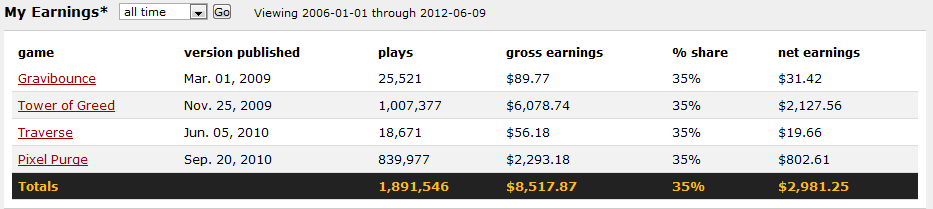
Before we dive into the technical aspects of implementing the Kongregate API, let’s get ourselves hyped up a little bit, and make sure that we actually want to implement it. There are many reasons to implement the API, but to most developers, nothing speaks louder than money, and there’s plenty of that involved. When you upload your game to Kongregate, you automatically earn 25% of all ad revenue generated by your game’s page. It gets better; if you implement their “Statistics & Challenges API”, you’ll receive an additional 10%! Finally, if your game is exclusive to Kongregate, or sponsored by them, you receive an additional 15%. This gives you the opportunity to earn up to 50% of the ad revenue for your game on Kongregate. If you’re wondering how much that is, check out some of my personal stats:

Step 2: Setting Up Our Work Environment

Read more: Using the Kongregate API in Your Flash Games

Monday, June 11, 2012

A sneak peek: Concurrency with ActionScript Workers

This week we just shipped Flash Player 11.3/AIR 3.3 with lots of cool features for mobile and desktop. But, we are already finalizing the last details on a brand new feature coming very soon, ActionScript Workers. Planned for the next Flash Player/AIR release, I am super excited about this feature. Here's why. The concept of concurrency is kind of the holy grail for most ActionScript developers who are working on complex projects. How many times, have you had issues with the UI locking and having to distribute computations to frames like crazy? How many times did you have to optimize your algorithms like crazy to minimize the cost of execution and reduce the risk of UI locking? Yeah, you have been there. Concurrency has always been popular in the Jira(290 votes), I remember having conversations over there with many developers following the status of this feature, I am sure some of you may think, well, better late than never. Again, the focus we have now on gaming or video, allows us to focus, so deliver valuable features like those much quicker. See all the features we introduced between Flash Player 11 and 11.3, most of the biggest requests from ActionScript developers are getting delivered and we will not stop there :) We started working on this feature last year, at that time, we were debating over how we would introduce concurrency to ActionScript developers, through a simple and safe way. We decided to go with a workers approach, cause it is a design most developers are today familiar with, which also can be API based rather than language based. We knew that we would not introduce a new keyword (for now) to leverage concurrency, so really workers made a lot of sense. How does it work? [...]
Read more: A sneak peek: Concurrency with ActionScript Workers

Saturday, June 9, 2012

State Machine for Continuous Movement: Desktop, iPad, iPhone

Heli iPadCovering the Bases
On the HTML5 side of the world, most developers/designers have been aware that when you make a site, you need to consider the different environments used to view your site. With Flash and AcitonScript 3.0, there’s a new dichotomy: Web and App. Because mobile devices like smart phones and tablets will not display Flash, it’s pretty much a decision to create a mobile app or to try and do the animation with JavaScript and related technology (e.g., jQuery). As more and more users have mobile hardware, the Web is a funny place. Apps are so much handier than any Web-based app that given the choice, I’ll use a device-based app. The reason is simple: you’re not always within range of a wifi. That’s it. No wifi; no working app. So in sticking with Flash and AS3, I am thinking in terms of the following:
  • Desktop: Standard Flash
  • Table: Mobile Flash Based App
  • Phone: Mobile Flash Based App
Having recently got an iPad 3, I’ve been able to compare the results on it with my iPhone and desktop. Basically, the tablet is right between the two in terms of performance. Using Flash Pro CS6 to develop a revised version of the Aid Game, I was able to create versions for the iPhone and iPad as well as a desktop version. You can play the desktop version on a non-mobile device and play the mobile versions on mobile table and phone devices. Click the buttons below for desktop Play or download all of the versions, including versions for Flash CS5 and Flash CS6.
Read more: State Machine for Continuous Movement: Desktop, iPad, iPhone

Run your Flash apps in Xcode iOS Simulator with AIR 3.3

Flash apps in Xcode iOS Simulator with AIR 3.3
AIR 3.3 adds a new feature to preview and debug your apps directly in iOS Simulator that is part of Xcode on Mac. This rapidly speeds up testing and preview of an app or a game especially when you use native extensions.
[Download AIR 3.3 SDK]
Simulator support is not yet part of the Flash Builder, but you can already use it via command-line:
Compile for iOS Simulator
There two new options available with adt for iOS Simulator compilation:
1) ipa-test-interpreter-simulator (for testing)
2) ipa-debug-interpreter-simulator (for debugging)
PATH_TO_AIR33SDK/bin/adt -package
-target ipa-test-interpreter-simulator
-provisioning-profile DEMO.mobileprovision
-keystore CERTIFICATE.p12
-storetype PKCS12
-storepass PASSWORD FINALAPP.ipa DESCRIPTOR.xml APP.swf


Read more: Run your Flash apps in Xcode iOS Simulator with AIR 3.3

Tuesday, June 5, 2012

Easily handle right mouse button in Flash movies

Detecting and handling right mouse clicks in Flash has always been a pain. I blogged about it four years ago in the post preventing the right mouse cheat in your Flash games where I explained a dirty trick to trigger right mouse button with As2, and guess what? Things got even worse with As3, although I found a workaround preventing players to cheat in my Flash game Stringy. Finally, the pain is over. With Flash Player 11.2, you can finally do everything you want in Flash movies, without exporting them for Air. Look at this movie: You can use left mouse button to drag boxes, and right mouse button to destroy them. Also notice, the default right click menu does not appear. Look at the source code: [...]
Read more: Easily handle right mouse button in Flash movies